Back to blog
Icon showing a gradient blend transition from red on the left to blue on the right on a small rounded square.
注目記事
Icon showing a gradient blend transition from red on the left to blue on the right on a small rounded square.
新リリース
Close-up of green-yellow onion bulbs with a slight root at the bottom.
教育
Illustration of a blue whale transitioning into green geometric shapes on a white background.
ニュースレター

Aproove Version 2022/R2 is now Released!

Written by: Gary Fisher

Aproove has changed its development strategy, providing shorter development sprint cycles, thus providing more frequent releases.

Sometimes Aproove will have significant new feature release announcements. Sometimes, a sprint could be a "maintenance" release that improves the core technology or provides the backend functions required for new features in coming releases.

The 2022/R2 release falls into the maintenance release category, although it does contain some noteworthy new features.

As 2022/R2 is classed as a maintenance release, we will not host a webinar for this release and will incorporate the new 2022/R2 features into our R3 release webinar in March 2022.

Below is a summary of the new features in version 2022/R2
Adobe InDesign Extension - Enhancements;

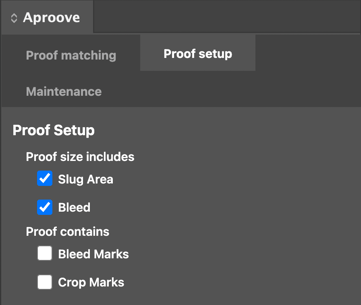
cropmarks adobe
  • Ability to specify if your PDF size includes a slug area and bleed and if your proof contains bleed marks and/or crop marks. This preference can be set as a default for all document/pdf syncs and also allows you to specify at a proof level if you have the odd exception to your default settings. Aproove will recalculate where to display the annotation notes to ensure they appear in the correct page position when adjusting your settings.
  • By default any new layers added to Adobe InDesign (by Aproove) will appear on the top of the layer display.
  • Change the behaviour so that when an operator clicks on a note;
    - 1st click - blinks to display the note on the page
    - 2nd click - blinks and zooms in on the note (the same zoom level used by the annotator)
    (Please note this behaviour has also been added to the review interface)

New Trigger and actions;

trigger

Triggers and Actions help to automate the business process. Aproove continuously adds more trigger and action functions based on real-world scenarios. The new actions listed below may not sound like much in isolation, but they can add huge advantages when the use case is understood. Please reach out to our customer success team if you want to know more about these new trigger and action capabilities.


  • Add a new action to automatically set and remove tags at note, proof, section or project level based on a trigger.
  • If a "conflict manager" is invoked in the workflow, allow this to trigger an automated action working alongside the current conflict management options

Dashboard Enhancements;
personal-dashboard


Aproove is constantly adding new features and functions to the dashboard. Some of new options are added to the administrator interface and turned off by default. This is done so that you have the choice to implement the new features/functions or ignore them based on your own user requirements. To learn more about any new dashboard enhancements, please contact our customer success team.

  • Added some tools tips for the default, and advanced filters to help users understand the buttons
  • Added some project options to "Hide Resolved Notes" and "Always Allow Comment" in the admin interface allowing you to decide the best behaviour for you at a project level
  • Added the ability for administrators to format JSON fields in the project info panel allowing users to see a custom display of project information
  • Added the option to show the NoteID after the Note Number in project config
  • Added the option to select the sender of tasks inside a project
  • When you have a list of tags for a task you can now see the order ID


PDF Export Enhancements;
feat-metadata

Many Aproove users export PDFs. As Aproove adds more functionality such as Proof tags, metadata, and more project information, you may want some of that information included in your PDF export. We are constantly adding more options to the PDF export feature.

  • Added proof, section and project tag options to the PDF export
  • Added an "include summary" option in the PDF export
  • We now display the note ID after the note number in the PDF export

Search Capabilities;
mini-search-1

Aproove had added a minor enhancement to our search capability after last month's massive announcement of the advanced and expert search filter functions.

  • Expert Searches now additionally support CurrentDate with a plus (+) and minus (-) option giving you the vast added scope on your date ranges on the search filters

Audit-ready at a moment’s notice.

Aproove makes accuracy, speed and scale realistic for regulated content. 

Resources

Keep on reading

View all
Close-up of digital noise or static texture with scattered gray and black pixels on a white background.

What's New: AI Agents in the Workflow, Improved Time Tracking, and Import / Export

AI Agents now score content, tag risk, and route proofs through Aproove workflows, so reviewers focus on the decisions that need a human.

7 min read
Read more
Close-up of green-yellow onion bulbs with a slight root at the bottom.
ビジネス自動化
Illustration of a human head with a yellow and blue gradient, showing a transparent brain with highlighted neural networks and connections inside.
ワークフロー自動化
Illustration of a blue whale transitioning into green geometric shapes on a white background.
AI
Close-up of digital noise or static texture with scattered gray and black pixels on a white background.

How Aproove Helps Grocery Chains Coordinate Weekly Promotions Across Hundreds of Locations

Learn how grocery retailers manage complex weekly promotions across multiple locations with Aproove’s marketing workflow automation, asset management, and approval tools.

10 min read
Read more
No items found.
Close-up of digital noise or static texture with scattered gray and black pixels on a white background.

9 Common Medicare Marketing Violations and How to Avoid Them

Learn the 9 most common Medicare marketing compliance violations and how Medicare Advantage plans can avoid CMS penalties through structured governance and oversight.

6 min read
Read more
No items found.

いつでも監査対応。

Aprooveは、規制対象コンテンツにおいて、正確性・スピード・スケールを現実のものにします。

Book a demo
Abstract blurred gradient background blending green, blue, and yellow colors.