


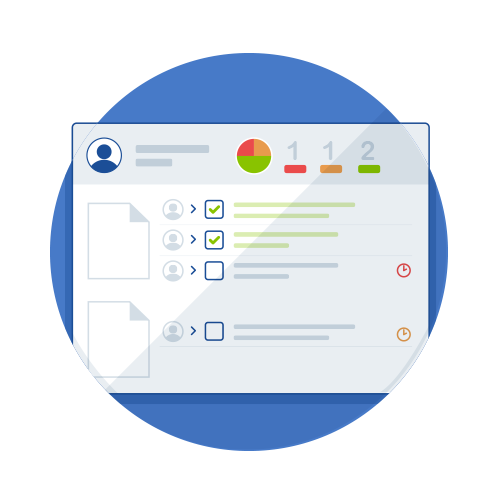
Aproove a modifié sa stratégie de développement, en proposant des cycles de développement plus courts et, par conséquent, des mises à jour plus fréquentes.
Aproove annonce parfois des mises à jour importantes intégrant de nouvelles fonctionnalités. Parfois, un sprint peut être une mise à jour de maintenance visant à améliorer la technologie de base ou à fournir les fonctions backend nécessaires aux nouvelles fonctionnalités des versions à venir.
La version 2022/R2 fait partie de cette catégorie, bien qu'elle intègre quelques nouvelles fonctionnalités notables.
Comme la version 2022/R2 est considérée comme une version de maintenance, nous n'organiserons pas de webinaire pour cette version et intégrerons les nouvelles fonctionnalités de la version 2022/R2 à notre webinaire de présentation de la version R3 en mars 2022.
Vous trouverez ci-dessous un résumé des nouvelles fonctionnalités de la version 2022/R2
Extension Adobe InDesign - Améliorations ;
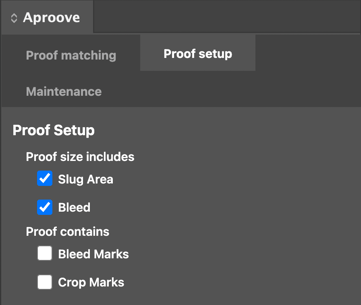
- Possibilité de spécifier si la taille de votre PDF inclut une zone de repères et un fond perdu, et si votre épreuve contient des repères de fond perdu et/ou de coupe. Cette préférence peut être définie comme valeur par défaut pour toutes les synchronisations de documents/PDF et vous permet également de la spécifier au niveau de l'épreuve si vous avez des exceptions à vos paramètres par défaut. Aproove recalculera l'emplacement d'affichage des notes d'annotation pour s'assurer qu'elles apparaissent à la bonne position sur la page lors de la modification de vos paramètres.
- Par défaut, tous les nouveaux calques ajoutés à Adobe InDesign (par Aproove) apparaîtront au-dessus de l'affichage des calques.
- Modifier le comportement afin que, lorsqu'un opérateur clique sur une note :
- 1er clic - clignote pour afficher la note sur la page
- 2e clic - clignote et effectue un zoom sur la note (au même niveau de zoom que celui utilisé par l'annotateur)
(Veuillez noter que ce comportement a également été ajouté à l'interface de révision)
Nouveau déclencheur et actions ;

Les déclencheurs et les actions permettent d'automatiser les processus métier. Aproove ajoute régulièrement de nouvelles fonctions de déclenchement et d'action basées sur des scénarios concrets. Les nouvelles actions listées ci-dessous peuvent paraître anodines prises individuellement, mais elles peuvent apporter des avantages considérables une fois le contexte d'utilisation compris. Veuillez contacter notre équipe de réussite client si vous souhaitez en savoir plus sur ces nouvelles fonctionnalités de déclenchement et d'action.
- Ajoutez une nouvelle action pour définir et supprimer automatiquement les balises au niveau des notes, des épreuves, des sections ou des projets en fonction d'un déclencheur.
- Si un « gestionnaire de conflits » est invoqué dans le flux de travail, autorisez-le à déclencher une action automatisée fonctionnant en parallèle des options de gestion des conflits actuelles.
Améliorations du tableau de bord ;
Aproove ajoute constamment de nouvelles fonctionnalités au tableau de bord. Certaines options sont ajoutées à l'interface d'administration et désactivées par défaut. Vous pouvez ainsi choisir d'activer ou de désactiver ces nouvelles fonctionnalités selon vos besoins. Pour en savoir plus sur les nouvelles améliorations apportées au tableau de bord, veuillez contacter notre équipe de réussite client.
- Ajout d'infobulles pour les filtres par défaut et avancés afin d'aider les utilisateurs à comprendre les boutons
- Ajout d'options de projet pour « Masquer les notes résolues » et « Toujours autoriser les commentaires » dans l'interface d'administration, vous permettant de choisir le comportement le plus adapté à vos besoins au niveau du projet
- Ajout de la possibilité pour les administrateurs de formater les champs JSON dans le panneau d'informations du projet, permettant ainsi aux utilisateurs d'afficher les informations du projet de manière personnalisée
- Ajout de l'option permettant d'afficher l'ID de la note après le numéro de note dans la configuration du projet
- Ajout de l'option permettant de sélectionner l'expéditeur des tâches au sein d'un projet
- Lorsqu'une liste d'étiquettes est disponible pour une tâche, vous pouvez désormais voir l'ID de commande
Améliorations de l'exportation PDF ;
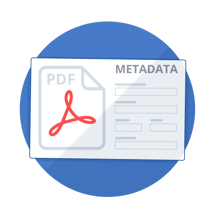
De nombreux utilisateurs d'Aproove exportent des PDF. À mesure qu'Aproove ajoute des fonctionnalités telles que les balises de preuve, les métadonnées et davantage d'informations sur le projet, vous souhaiterez peut-être inclure certaines de ces informations dans votre exportation PDF. Nous ajoutons constamment de nouvelles options à la fonction d'exportation PDF.
- Ajout d'options pour les balises de preuve, de section et de projet à l'exportation PDF
- Ajout d'une option « Inclure le résumé » à l'exportation PDF
- Nous affichons désormais l'ID de la note après son numéro dans l'exportation PDF.
Fonctionnalités de recherche ;

Aproove a apporté une légère amélioration à sa fonction de recherche suite à l'annonce majeure du mois dernier concernant les fonctions de filtrage avancées et expertes.
- Les recherches expertes prennent désormais en charge la date actuelle avec les options plus (+) et moins (-), ce qui vous offre une plus grande flexibilité pour vos plages de dates dans les filtres de recherche.