



Aproove has changed its development strategy, providing shorter development sprint cycles, thus providing more frequent releases.
Sometimes Aproove will have significant new feature release announcements. Sometimes, a sprint could be a "maintenance" release that improves the core technology or provides the backend functions required for new features in coming releases.
The 2022/R2 release falls into the maintenance release category, although it does contain some noteworthy new features.
As 2022/R2 is classed as a maintenance release, we will not host a webinar for this release and will incorporate the new 2022/R2 features into our R3 release webinar in March 2022.
Below is a summary of the new features in version 2022/R2
Adobe InDesign Extension - Enhancements;
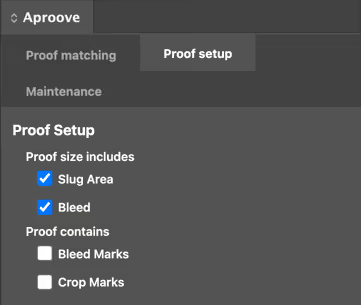
- Ability to specify if your PDF size includes a slug area and bleed and if your proof contains bleed marks and/or crop marks. This preference can be set as a default for all document/pdf syncs and also allows you to specify at a proof level if you have the odd exception to your default settings. Aproove will recalculate where to display the annotation notes to ensure they appear in the correct page position when adjusting your settings.
- By default any new layers added to Adobe InDesign (by Aproove) will appear on the top of the layer display.
- Change the behaviour so that when an operator clicks on a note;
- 1st click - blinks to display the note on the page
- 2nd click - blinks and zooms in on the note (the same zoom level used by the annotator)
(Please note this behaviour has also been added to the review interface)
New Trigger and actions;

Triggers and Actions help to automate the business process. Aproove continuously adds more trigger and action functions based on real-world scenarios. The new actions listed below may not sound like much in isolation, but they can add huge advantages when the use case is understood. Please reach out to our customer success team if you want to know more about these new trigger and action capabilities.
- Add a new action to automatically set and remove tags at note, proof, section or project level based on a trigger.
- If a "conflict manager" is invoked in the workflow, allow this to trigger an automated action working alongside the current conflict management options
Dashboard Enhancements;
Aproove is constantly adding new features and functions to the dashboard. Some of new options are added to the administrator interface and turned off by default. This is done so that you have the choice to implement the new features/functions or ignore them based on your own user requirements. To learn more about any new dashboard enhancements, please contact our customer success team.
- Added some tools tips for the default, and advanced filters to help users understand the buttons
- Added some project options to "Hide Resolved Notes" and "Always Allow Comment" in the admin interface allowing you to decide the best behaviour for you at a project level
- Added the ability for administrators to format JSON fields in the project info panel allowing users to see a custom display of project information
- Added the option to show the NoteID after the Note Number in project config
- Added the option to select the sender of tasks inside a project
- When you have a list of tags for a task you can now see the order ID
PDF Export Enhancements;

Many Aproove users export PDFs. As Aproove adds more functionality such as Proof tags, metadata, and more project information, you may want some of that information included in your PDF export. We are constantly adding more options to the PDF export feature.
- Added proof, section and project tag options to the PDF export
- Added an "include summary" option in the PDF export
- We now display the note ID after the note number in the PDF export
Search Capabilities;

Aproove had added a minor enhancement to our search capability after last month's massive announcement of the advanced and expert search filter functions.
- Expert Searches now additionally support CurrentDate with a plus (+) and minus (-) option giving you the vast added scope on your date ranges on the search filters