Back to blog
Icon showing a gradient blend transition from red on the left to blue on the right on a small rounded square.
注目記事
Icon showing a gradient blend transition from red on the left to blue on the right on a small rounded square.
新リリース
Close-up of green-yellow onion bulbs with a slight root at the bottom.
教育
Illustration of a blue whale transitioning into green geometric shapes on a white background.
ニュースレター

Aproove Version 2022/R1 New Year, New Release!

Written by: Gary Fisher

We wanted to get 2022 off with a bang by announcing an exciting new Aproove Work Management release featuring the
Adobe InDesign Extension!

The first release of 2022 brings significant benefits to any business dealing with Adobe InDesign files either in-house or via a 3rd party supplier. The new Adobe InDesign plugin allows production users to interact with Aproove business workflows without leaving their native Adobe InDesign application!

The 2022/R1 release also brings many new features and enhancements, including a significant version 3 of the Aproove API containing over 50 new functions. But that's not all! We have also launched a fantastic new advanced search, additional review interface capabilities, form enhancements, and more! Please see below for more details.

Register below to join our Webinar on Wednesday 26th January 2022 to Learn More about the Adobe InDesign plugin and other release information!

Register for Webinar
Below is a summary of the new features in version 2022/R1
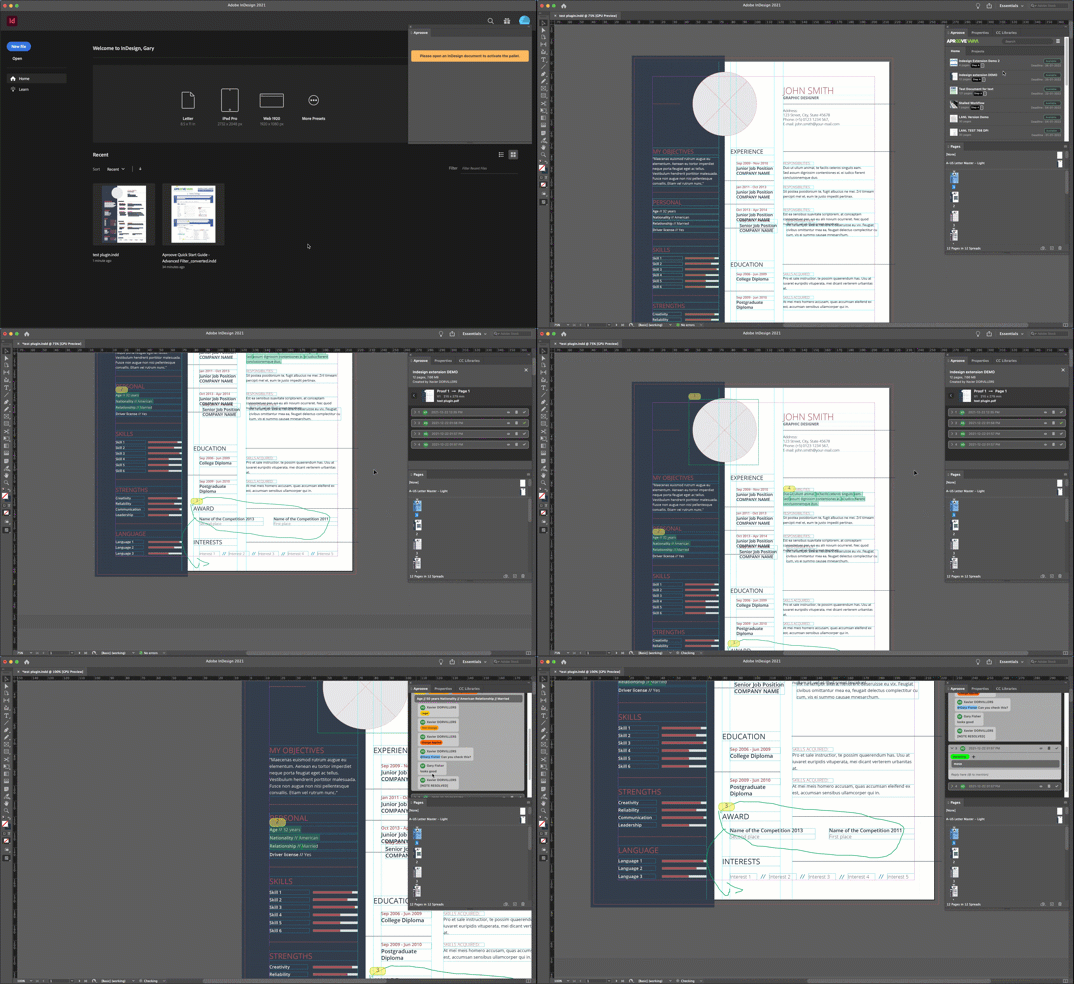
Adobe InDesign Extension;

Indd_Extension


The new Adobe InDesign extension will allow your production teams, freelancers, or even external agencies to access Aproove directly from within Adobe InDesign. Some of the features include;

  • View Annotations directly inside Adobe InDesign!
  • @mention, and comment on annotations from within Adobe InDesign
  • In-built chat function within the Adobe Plugin!
  • InDesign Users see assigned "tasks" and "Team task" directly within the extension. Users can start assigned tasks without leaving InDesign.
  • Link annotated PDFs to your InDesign File and sync pages. Use regular expressions to determine how Adobe InDesign finds the corresponding annotated PDF
  • Users can be asked to fill out a timesheet when they complete assigned tasks
  • Upload new proofs directly back into Aproove
  • Add note tags and even use forms within the tags
  • Search for notes
  • View the Aproove home page and project lists
  • Navigate through your projects in the file tree

The InDesign extension will be available to all Aproove Classic and Enterprise customers. Each paid user account comes with a FREE InDesign plugin allowing users to log in to the InDesign plugin or the Aproove application using your account credentials. (you cannot log in to both simultaneously).

The Adobe InDesign extension opens up endless possibilities allowing you to use Aproove across your production teams, meaning they never have to leave their native application! (No more printing out annotations or asking art workers to view them on a separate screen!)

You can even supply the Adobe InDesign extension to your outsourced production companies allowing them to receive amendments directly within InDesign and access files stored in your Aproove Drive!

The Adobe InDesign extension is the first step; we will follow up with Adobe Photoshop and Adobe Illustrator extensions in 2022 and expand the usage to incorporate the user's "to-do" list and enable drag and drop from the Aproove Drive directly onto the page!

Need more accounts?

If you require more user accounts to expand the Adobe InDesign extension usage, Enterprise customers can purchase additional "Dashboard" user accounts, and Classic customers can buy extra "Standard" user accounts.

What else is new?

api-1

Aproove REST and RPC API;

Version 3 of the Aproove API in both REST and RPC is officially launched. This version contains over 50 new documented functions allowing you to achieve even deeper integrations with your technology stack! 


Review Interface;

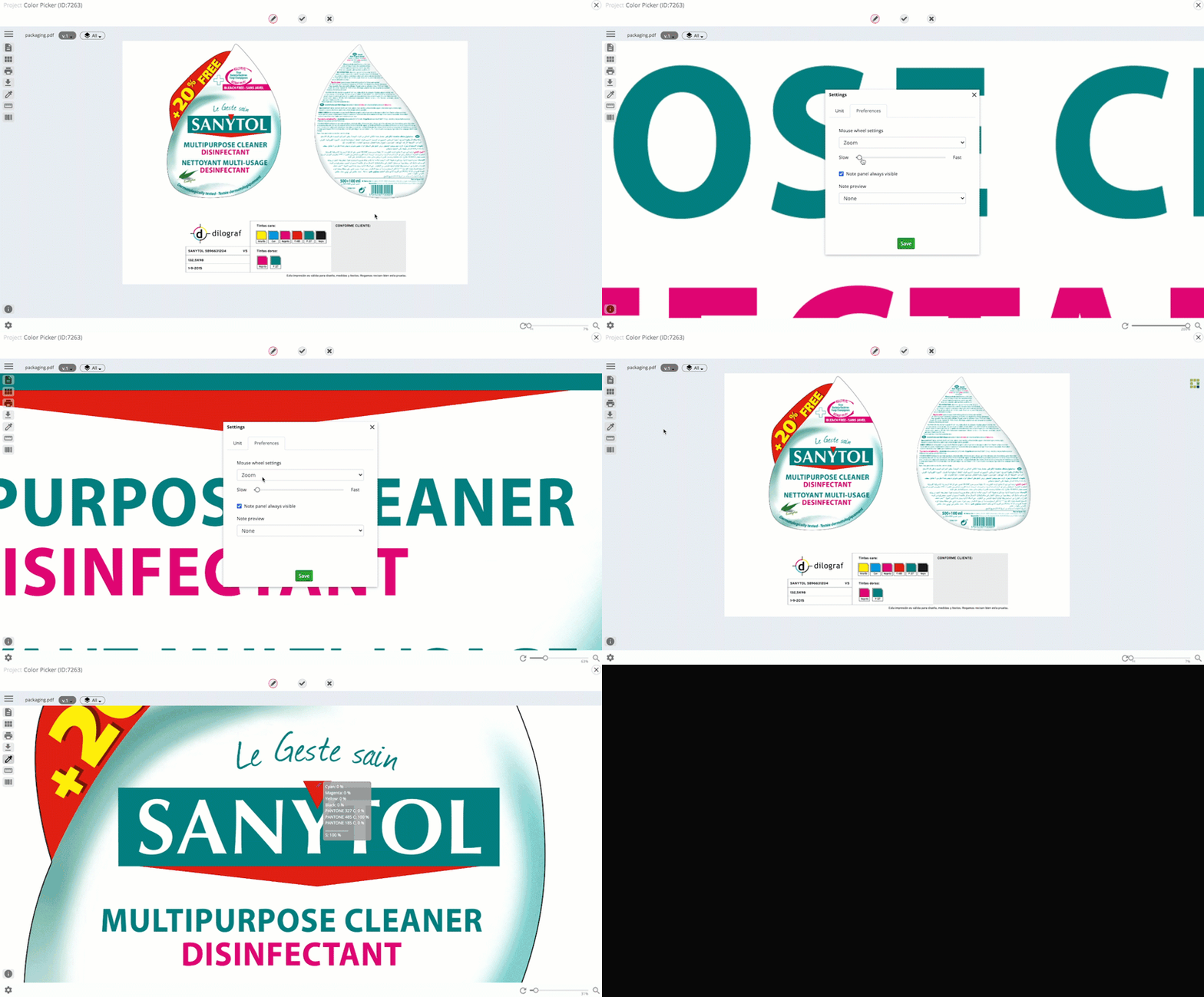
RI_New_Features_2022R1
  • Unique to Aproove, we have added the ability for users to compare assets from a different project in the comparison view!
  • When using the color picker tool (to gather color breakdown on the selected area of a proof), you can now add the color values directly to an annotation note
  • We have added a function (by clicking on the magnifying glass icon in the review interface) that allows users who have zoomed into a file to quickly "re-center" and "fit the asset to the window size
  • Each user now has a new preference setting in the review interface, allowing them to control the zooming speed in the review interface.
feat-metadata
Metadata

Aproove has rebuilt the metadata model, which will allow future versions of Aproove to handle metadata at any object level, including projects, folders, files, notes, sections, proofs, etc.
This major overhaul will bring significant features to the product in future releases.


Advanced & Expert Search/Filter

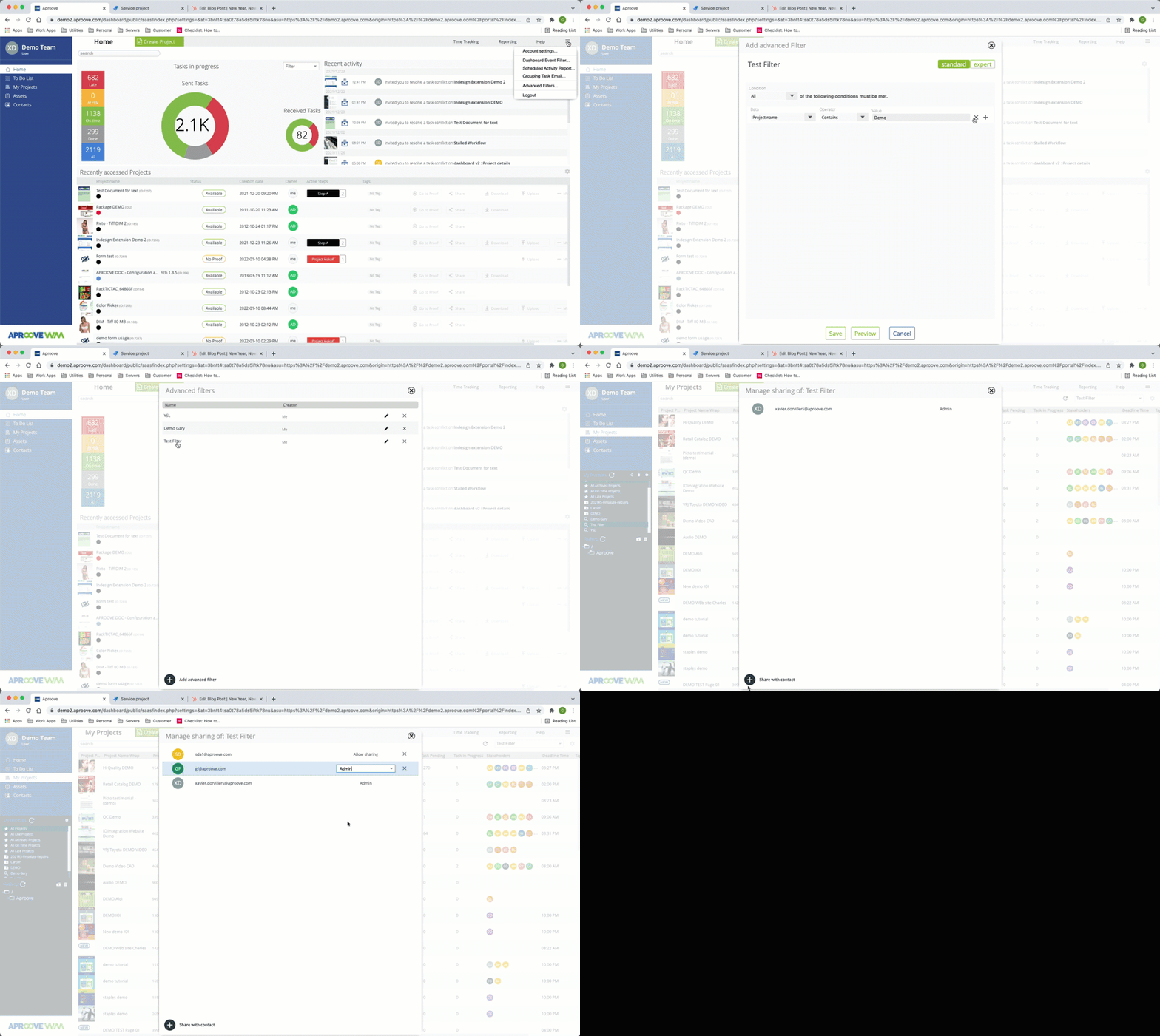
AdvancedSearch_2022R1

The new metadata structure mentioned above has allowed Aproove to expand the search engine, to search across all components and metadata.

The search has also incorporated a new "advanced search" feature allowing users to create and save searches. Users can also share those saved searches with other users (if granted permission).

For advanced users, Aproove has also incorporated the "Aproove Query Language," allowing for queries to be built directly in the search interface with user prompts around the syntax.

Learn more about Advanced and Expert Search by clicking here!

 
form_webinar
Forms
  • We added a fantastic new feature that lets users kick off a project by selecting a form from the project creation wizard. This allows workflows to be started manually without sending an initial task. The form will immediately appear, allowing the user to complete the information necessary inside the form to kick off a project.
  • We made another form enhancement for user convenience by moving the decision buttons to display outside the form in the footer. This enhancement helps users by saving them from having to scroll to the bottom of the form to execute a decision or even miss the decision button in the first place!
  • Another new form feature allows users to download files that have been uploaded into a form previously.

Dashboard Enhancements

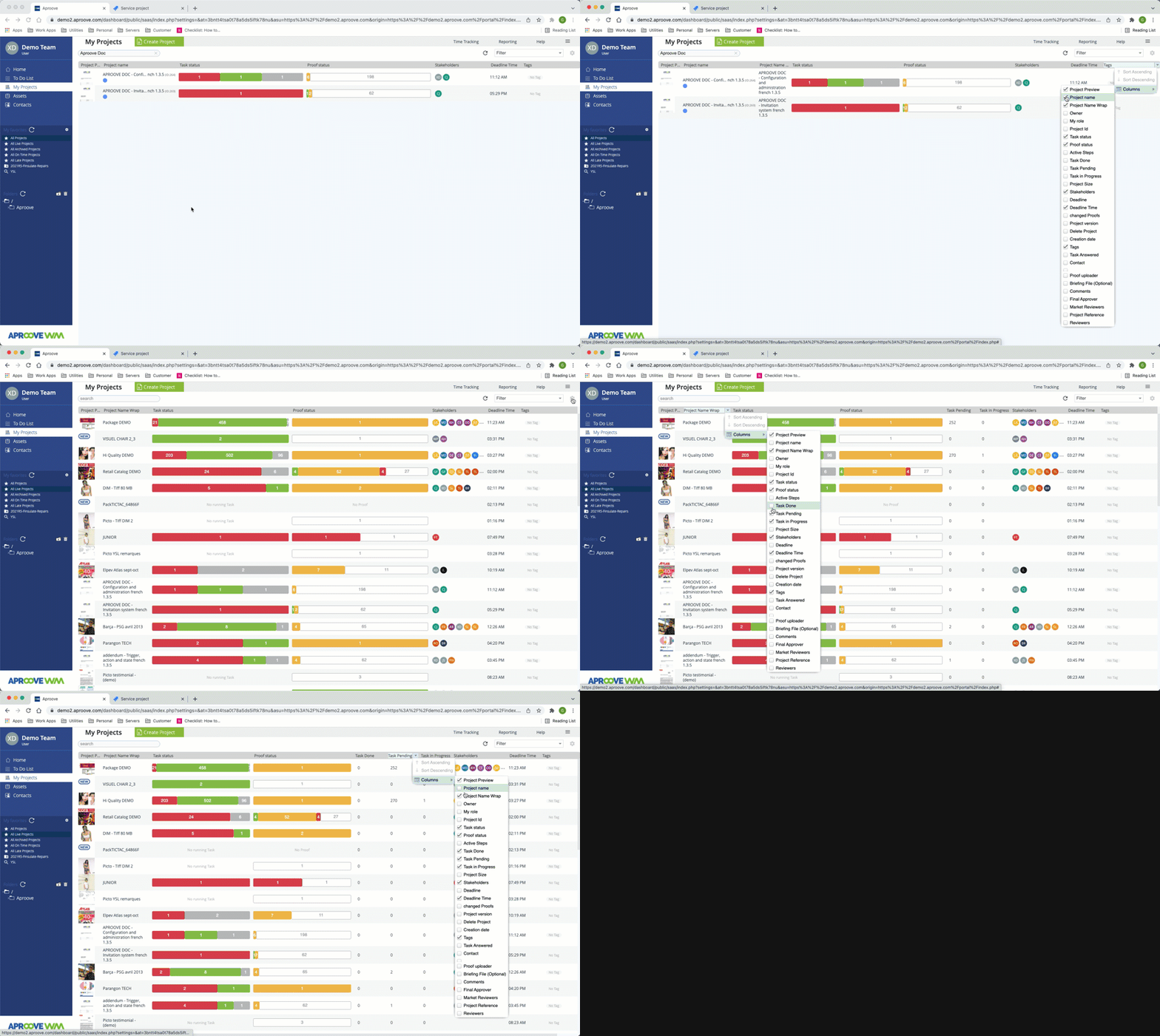
Dashboard_2022R1
  • For users who have long filenames, we added a new column that allows you to wrap the filenames into a new line rather than hovering over the name to reveal the full name.
  • We added new columns counters for a quick status summary on tasks answered, tasks done, tasks pending, and tasks in progress
  • The Aproove Project ID used to be displayed with the project name. The Project ID now has a dedicated column.

trigger
Trigger & Actions
  • When the action of a note being "resolved," is triggered, this can fire an action to make that note read-only" (The resolved action can also be used to execute any of the existing actions)
  • When using the existing Export PDF action, you now can insert a custom message to the user who executed the action.
 
Video-Graphic
Reporting on Video Assets

The recently enhanced video capabilities in Aproove have been extended further. Users can now create reports that include annotation snapshots of the video markup in the report.


Audit-ready at a moment’s notice.

Aproove makes accuracy, speed and scale realistic for regulated content. 

Resources

Keep on reading

Close-up of digital noise or static texture with scattered gray and black pixels on a white background.

ダウンストリームの管理責任:2027年度ACA最終規則が貴社のマーケティングに意味すること

2027年度のACA最終規則により、エージェント、ブローカー、およびウェブブローカーは、自社に代わって行われるマーケティング活動に対して責任を負うことになりました。変更点と準備方法をご確認ください。

7 min read
Illustration of a blue whale transitioning into green geometric shapes on a white background.
保険マーケティング
Icon of a plant seed sprouting with two green leaves on a gradient green to yellow background.
コンプライアンス
Close-up of digital noise or static texture with scattered gray and black pixels on a white background.

新機能:ワークフローにおけるAIエージェント、時間追跡機能の改善、インポート/エクスポート機能

AIエージェントがコンテンツのスコアリング、リスクのタグ付け、およびAprooveワークフローを通じた校正のルーティングを行うようになったため、レビュー担当者は人間の判断が必要な決定に集中できるようになりました。

7 min read
Close-up of green-yellow onion bulbs with a slight root at the bottom.
ビジネス自動化
Illustration of a human head with a yellow and blue gradient, showing a transparent brain with highlighted neural networks and connections inside.
ワークフロー自動化
Illustration of a blue whale transitioning into green geometric shapes on a white background.
AI
Close-up of digital noise or static texture with scattered gray and black pixels on a white background.

Aprooveが食料品チェーンの数百店舗にわたる週替わりプロモーションの調整をどのように支援するか

Aprooveのマーケティングワークフロー自動化、資産管理、承認ツールを活用して、食料品小売業者が複数の店舗にわたる複雑な週替わりプロモーションをどのように管理しているかをご覧ください。

10 min read
No items found.

いつでも監査対応。

Aprooveは、規制対象コンテンツにおいて、正確性・スピード・スケールを現実のものにします。

Abstract blurred gradient background blending green, blue, and yellow colors.