Back to blog
Icon showing a gradient blend transition from red on the left to blue on the right on a small rounded square.
注目記事
Icon showing a gradient blend transition from red on the left to blue on the right on a small rounded square.
新リリース
Illustration of a human head with a yellow and blue gradient, showing a transparent brain with highlighted neural networks and connections inside.
業界ニュース

Aproove Introducing Note Tags!

Written by: Xavier Dorvillers

A major enhancement to our Online Proofing functionality "Note Tags" are designed to help with identification, classification, and decisions on individual annotation notes.

What are Note Tags?

Note Tags introduce a new way of managing annotation workflows. Note Tags cover multiple needs ranging from automated note identification to complex approval and decisions at a note level. 

Note tags can automatically be applied when users make annotations, and permissions can be used at a project level to determine what note tags (if any) are available to the different users.

Note Tags can be added when a user creates an annotation note (automatically, manually, or a combination of both). Note Tags can also be made available or hidden at different step stages based on your workflow requirements. 

We never stopped there! To enhance this feature even further, you can (optionally) request a user to explain the reason they chose a particular note tag. For example, if a user uses a note tag of "reject note," you may want an explanation of why they rejected the note.

Applying Note Tags can also set the visibility of the annotation notes for other users. For example, notes tagged with "marketing team" could be hidden from the users in the "legal" team.

Note tags can also be sorted and filtered upon, which allows users to concentrate on specific notes tagged with a certain category. Finally, note tagging is available to users who want to generate reports for identifying trends, bottlenecks, or behavioral patterns in the review cycle based on note tags.

Note tags have a wide variety of uses across all business sectors. Below are two use case examples supported by short videos to show the behavior.

Use Case Example 1;
Annotation Notes Classification

Conditions

  • You have a weekly circular in a retail environment, and that circular has different categories of products on the page, eg., dairy, meat, grocery, and alcohol.
  • Different merchandisers are reviewing the page/s, and those merchandisers are responsible for different departments. In our example, we will use dairy.
  • As our merchandiser marks up the dairy section on the page, the note automatically gets tagged with "Dairy" on the annotation note.
  • Optionally, you can also allow permissions for the merchandiser to add other tags, but they can never remove the "dairy" tag.
Notes classification


Business Case

  •  Anyone with permission can now "filter" on the note tags, for example, the line manager of the dairy section could opt only to see the notes created by the "dairy" merchandiser. This means they can ignore all the other annotation notes related to the different departments, which do not concern them.
  • Having the notes tagged allows for very detailed reporting at a very granular level based on the notes entered by different departments or teams.


Use Case Example 2;
Annotation Notes Review

Conditions

  • You want to allow specific user/s the ability to review the other reviewer's notes to either classify them (see classification example) or to make a decision on the note.
  • The reviewer looks at the other reviewer's notes and decides to "accept note" or "reject note" the individual annotations.
  • When the user adds the "reject note" tag, they have to fill out a reason why they rejected the comment, and without giving a reason, they cannot apply the "reject note" tag.
Validate notes

Business Case

  • It this scenario, a checking mechanism is in place to validate the notes of the reviewers. This could be for numerous reasons such as compliance, legal check, or simply to ensure concise feedback to the artworker tasked to make the changes.
  • Reporting can get invoked to analyze the level of note rejection or acceptance. This could be useful to identify problems in the workflow, to prompt training or spot trends.


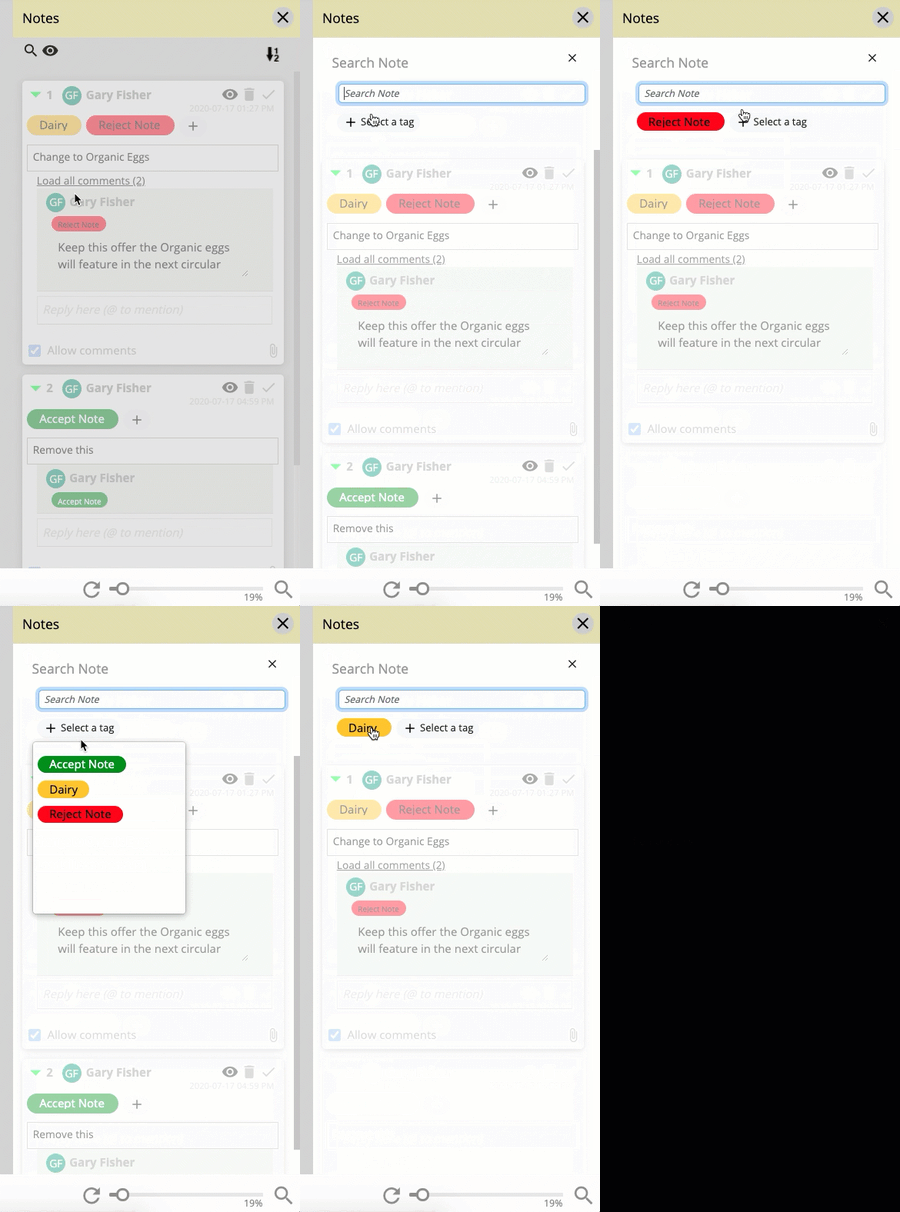
Filter on your Note Tags

Another fantastic feature is the ability to filter on your note tags. This allows users to only see the annotation notes that are tagged with the criteria they require. Furthermore the administrator has the ability to hide notes tagged with certain criteria and only display them to selected users. 

Filter notes

Unlimited Note Tags can be created in the Aproove Enterprise version, and our Aproove Classic customers can have up to 5 custom note tags applied to their account. Please contact our Customer Success Team for further details.

Audit-ready at a moment’s notice.

Aproove makes accuracy, speed and scale realistic for regulated content. 

Resources

Keep on reading

View all
Close-up of digital noise or static texture with scattered gray and black pixels on a white background.

What's New: AI Agents in the Workflow, Improved Time Tracking, and Import / Export

AI Agents now score content, tag risk, and route proofs through Aproove workflows, so reviewers focus on the decisions that need a human.

7 min read
Read more
Close-up of green-yellow onion bulbs with a slight root at the bottom.
ビジネス自動化
Illustration of a human head with a yellow and blue gradient, showing a transparent brain with highlighted neural networks and connections inside.
ワークフロー自動化
Illustration of a blue whale transitioning into green geometric shapes on a white background.
AI
Close-up of digital noise or static texture with scattered gray and black pixels on a white background.

How Aproove Helps Grocery Chains Coordinate Weekly Promotions Across Hundreds of Locations

Learn how grocery retailers manage complex weekly promotions across multiple locations with Aproove’s marketing workflow automation, asset management, and approval tools.

10 min read
Read more
No items found.
Close-up of digital noise or static texture with scattered gray and black pixels on a white background.

9 Common Medicare Marketing Violations and How to Avoid Them

Learn the 9 most common Medicare marketing compliance violations and how Medicare Advantage plans can avoid CMS penalties through structured governance and oversight.

6 min read
Read more
No items found.

いつでも監査対応。

Aprooveは、規制対象コンテンツにおいて、正確性・スピード・スケールを現実のものにします。

Book a demo
Abstract blurred gradient background blending green, blue, and yellow colors.