Back to blog
Illustration of a human head with a yellow and blue gradient, showing a transparent brain with highlighted neural networks and connections inside.
ニュース
Icon showing a gradient blend transition from red on the left to blue on the right on a small rounded square.
注目記事
Icon showing a gradient blend transition from red on the left to blue on the right on a small rounded square.
新リリース
Close-up of green-yellow onion bulbs with a slight root at the bottom.
教育

Announcing PDF Layer Support in the Aproove Work Management Review Interface!

Written by: Gary Fisher

Adding PDF layer support is a significant enhancement of the Aproove Work Management Review Interface, giving our customers a competitive edge not seen in other technologies!

Optionally allowing your reviewers to see any layers inside a PDF document is a great starting point, but we never stopped there! We also added many surrounding features that enable you to restrict layers to different users and groups and store the viewing conditions (what layers were turned on or off) to know the reviewer's exact viewing conditions when they made the annotation note.

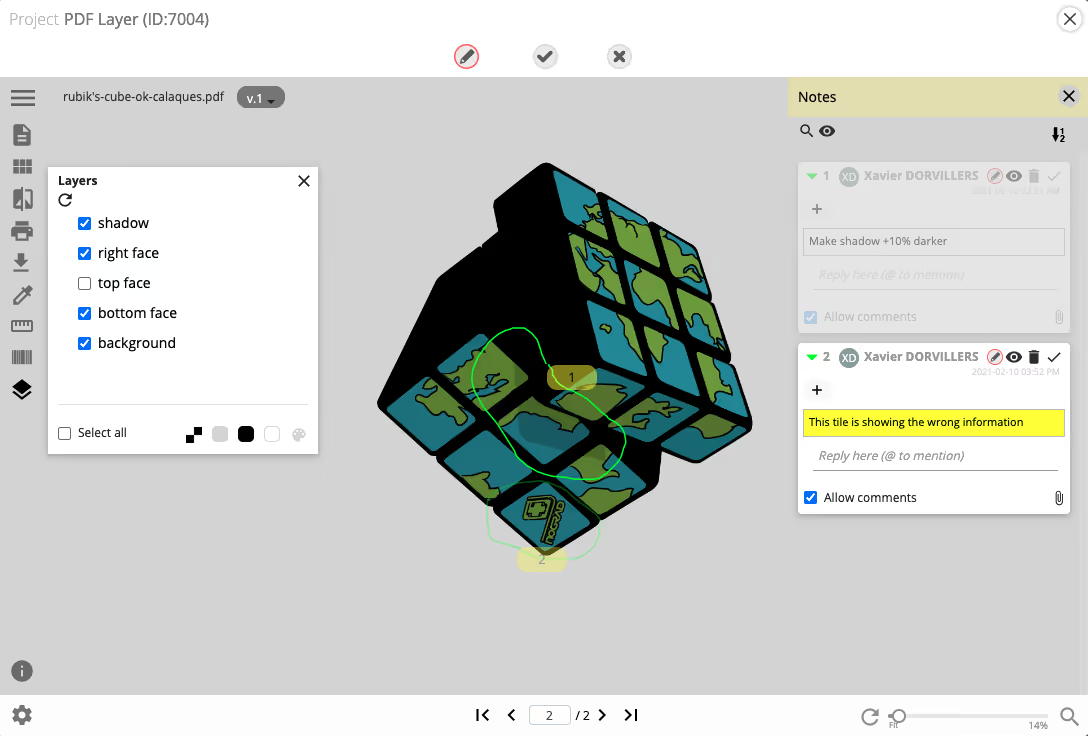
Introducing PDF Layer Display;


From the review interface, users (with permissions) can now view any layers that are part of a PDF proof. The layers that were visible when the PDF was created will get shown by default; however, reviewers can select what combination of layers they wish to display, including the layers that were not even active when the file got saved.

This is particularly useful if, for example, you want to display objects that may not get printed, such as a cutter guide, or perhaps you have multiple 5th black layers that are for different languages that overprint the standard four colors.

The power of the layer display feature gets greatly enhanced when you discover that you can even restrict the visibility and usability of different layers to different users and groups.

The Aproove engine shows the layer combinations at lightning-fast speed thanks to the layers being pre-rendered. This feature is no gimmick, it handles transparency, and it can even cater to customers who require the ability to show complex blends across layers.

Layer Viewing Conditions;


See the video above; when clicking on any reviewer notes, the layers adjust to the exact display conditions as the reviewer who posted the annotation. This gives you the same viewing conditions as the reviewer, ensuring you have the same context.

What's more, if you export and download the Annotated PDF from Aproove, the report will detail what layers were visible on each note. This information is stored in the database, giving a full audit trail.  

Background Simulation;

Not content as just showing the layers inside a PDF, Aproove Work Management also gives you the ability to choose a transparent or colored background. This could be useful if you wish to see transparency in your objects, or perhaps you want to simulate your PDF objects against a paper color?

Summary;

The new PDF layer support is a massive development that will allow companies of different verticals such as Packaging, Security Print, Catalogue, and Engineering to benefit from seeing all the layers within a PDF, which has previously not been possible inside a review interface.

The extra detail, such as restricting layers to different users and groups, takes the feature into a powerful workflow automation capability that can increase productivity and reduce cost. 

Talk To Aproove!


Audit-ready at a moment’s notice.

Aproove makes accuracy, speed and scale realistic for regulated content. 

Resources

Keep on reading

View all
Close-up of digital noise or static texture with scattered gray and black pixels on a white background.

What's New: AI Agents in the Workflow, Improved Time Tracking, and Import / Export

AI Agents now score content, tag risk, and route proofs through Aproove workflows, so reviewers focus on the decisions that need a human.

7 min read
Read more
Close-up of green-yellow onion bulbs with a slight root at the bottom.
ビジネス自動化
Illustration of a human head with a yellow and blue gradient, showing a transparent brain with highlighted neural networks and connections inside.
ワークフロー自動化
Illustration of a blue whale transitioning into green geometric shapes on a white background.
AI
Close-up of digital noise or static texture with scattered gray and black pixels on a white background.

How Aproove Helps Grocery Chains Coordinate Weekly Promotions Across Hundreds of Locations

Learn how grocery retailers manage complex weekly promotions across multiple locations with Aproove’s marketing workflow automation, asset management, and approval tools.

10 min read
Read more
No items found.
Close-up of digital noise or static texture with scattered gray and black pixels on a white background.

9 Common Medicare Marketing Violations and How to Avoid Them

Learn the 9 most common Medicare marketing compliance violations and how Medicare Advantage plans can avoid CMS penalties through structured governance and oversight.

6 min read
Read more
No items found.

いつでも監査対応。

Aprooveは、規制対象コンテンツにおいて、正確性・スピード・スケールを現実のものにします。

Book a demo
Abstract blurred gradient background blending green, blue, and yellow colors.