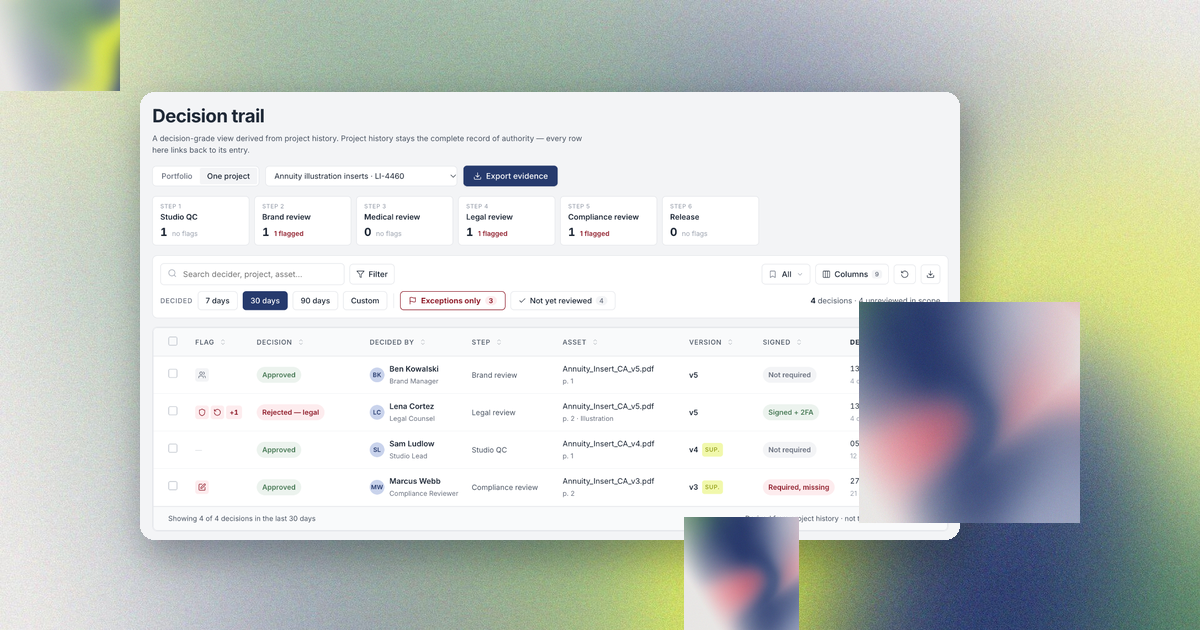
Product marketing, packaging, technical documentation and regulatory teams at consumer electronics brands, appliance makers, medical device companies and private-label distributors answer for the same result at every launch. Each package, label, manual, product page and video that reaches a market must state only claims that legal or regulatory approved, and must include every statement that the market requires.
Launch teams approve more files with every SKU and every market they add. A consumer products brand we spoke with in 2026 approves 15 to 25 assets a week, and several hundred a week before a launch, and the brand's legal team substantiates about 20 claims for each product. Package designers, technical writers, marketers, agencies, suppliers and printers each produce part of the launch material, and each group reviews its own material in its own approval workflow software. When legal keeps the approved claims in one system and each team reviews in another, nobody on the launch team can list which approved claims appear in which piece of material.
This article shows where launch teams lose track of approved claims, what approval workflow software has to do for a launch, and how Aproove checks packaging, manuals, marketing and video against one source of approved product information.
Table of Contents
- Launch teams repeat the same approved claims and supplier facts on packaging, in manuals, in marketing and in video
- Each team reviews its own material in its own approval workflow software
- Documentation teams and distributors collect reviews and supplier approvals by email
- Approval workflow software for a launch shows approved facts beside each draft and records every decision
- Signs that your launch teams check claims by hand
- Aproove runs every launch material in one approval workflow
- Aproove connects to the claims, content and quality systems you already run
- FAQs
Launch teams repeat the same approved claims and supplier facts on packaging, in manuals, in marketing and in video
Each kind of launch material has its own producers, reviewers and deadline, and each producer repeats facts that legal, regulatory, quality or the product team approved somewhere else.
Launch material | Producers | Reviewers | Approved facts repeated |
|---|---|---|---|
Packaging and labels | Package designer, label specialist, printer | Regulatory, legal, quality, product, supplier | Claims, warnings, symbols, barcodes, country of origin, supplier specifications |
Technical documentation and user manuals | Technical writers | Engineering, regulatory, legal, product, support, translators | Warnings, specifications, compliance statements, safety instructions |
Marketing (web, retail, print, social) | Marketing team and agencies | Legal, regulatory, brand, product | Claims, required disclosures, specifications |
Video | Video producer and agency | Legal, regulatory, brand | Claims in voiceover and on-screen text, warnings shown on screen |
Legal or regulatory substantiates product claims, such as a run time, a suction rating or "clinically validated." The contract manufacturer and component suppliers provide supplier information, such as materials, country of origin, battery specifications and the GTIN behind each barcode. Regulators and retailers require product compliance content, such as warnings, the FCC statement for a radio, the CE mark, recycling symbols and the importer's address.
When one approved fact changes, every team that repeats the fact has to change its material. If a contract manufacturer moves production to a new plant, the package designer changes the country of origin on the package, the technical writer changes the manual's regulatory page, and marketing changes the retailer listing. Each person first has to find every file that states the old country.
Each team reviews its own material in its own approval workflow software
Marketing teams usually review creative in an online proofing tool or a work management platform. Packaging teams approve artwork in an artwork management system or the printer's portal. Technical writers email PDFs to reviewers. Legal keeps substantiated claims and their evidence in a spreadsheet, a claims database or a platform such as Veeva.
The consumer products brand mentioned above kept claims in one system and creative review in another, so a coordinator copied each reviewer comment from one system into the other by hand. Designers uploaded each revision as a new file, reviewers no longer saw the previous round's comments, and reviewers compared drafts from memory. Neither system recorded which claims appeared in which assets.
Medical device makers describe the same pattern. In Veeva's 2024 survey of more than 130 commercial medtech leaders, nearly 70 percent said their companies rely on manual processes and homegrown applications to manage content and claims. Among the companies that work that way, 60 percent said an approval takes more than four weeks.
Documentation teams and distributors collect reviews and supplier approvals by email
A documentation team at a consumer electronics brand described its review process to us in 2026. A technical writer sends one PDF of a manual to 10 to 20 reviewers from engineering, regulatory, legal, product and support, and gives the reviewers five days. The writer loses track of the review when:
- reviewers forward the PDF to colleagues the writer has never met, so the writer cannot say who reviewed the manual;
- a forwarded email arrives without the attachment, and someone grants each new reviewer file access by hand;
- a reviewer asks to see a second draft, and the writer builds a new review form and chooses the reviewers again;
- the project ends, and the writer has to archive the review by hand, a step writers often skip.
Private-label distributors collect supplier approvals by email too. A distributor's product team gathers product information from each supplier by spreadsheet, writes a product information document, and sends the label artwork back to the supplier. The supplier approves by replying to the email, and the distributor's quality team cannot audit that reply in any system.
Approval workflow software for a launch shows approved facts beside each draft and records every decision
A team that evaluates approval workflow software for a launch can test each requirement below against its own launch.
Requirement | What the team should be able to do |
|---|---|
One plan for every material | Run packaging, manuals, marketing and video as parallel branches of one project, each with its own reviewers and deadline |
One source of approved facts | See approved claims, supplier information and compliance content beside each draft, and record which version of each fact each approved file contains |
Checks before review | Have AI agents compare each draft with the approved facts and flag differences for a reviewer to accept or reject |
Decisions that route the next round | Let each reviewer's decision set whether that reviewer sees the next draft |
Every file type in the browser | Review PDF, artwork, HTML, image and video files, with version comparison |
Outside reviewers on the record | Let suppliers, printers, agencies and translators approve as named guests without a license |
One decision record | List every approval in the launch and build an audit pack on request |
Signs that your launch teams check claims by hand
Your team keeps each piece of material in line with the approved facts by hand if any of these statements is true:
- Reviewers check claims against a spreadsheet open in a second window.
- The approved wording of a claim for one market exists only in an email thread.
- When a supplier changes a fact, nobody opens a review of the packages and manuals that state the old fact.
- Printers and suppliers approve artwork by replying to an email.
- Nobody can list, within an hour, every package, manual page, web page and video that states a given claim.
If two or more of these statements describe your launch, nobody on your team can show an auditor the comments that someone copied by hand from one tool into another.
Aproove runs every launch material in one approval workflow
Aproove runs production and approval for packaging, technical documentation, marketing and video in one system, and checks every draft against one source of approved product information. The figures below follow a medical device launch, the CardioCheck 300 blood pressure monitor from Corvale Health.
A campaign groups every project in the launch
Aproove groups every project in a launch into a campaign, and shows on the campaign page the owner, the in-market date and the progress of each project.
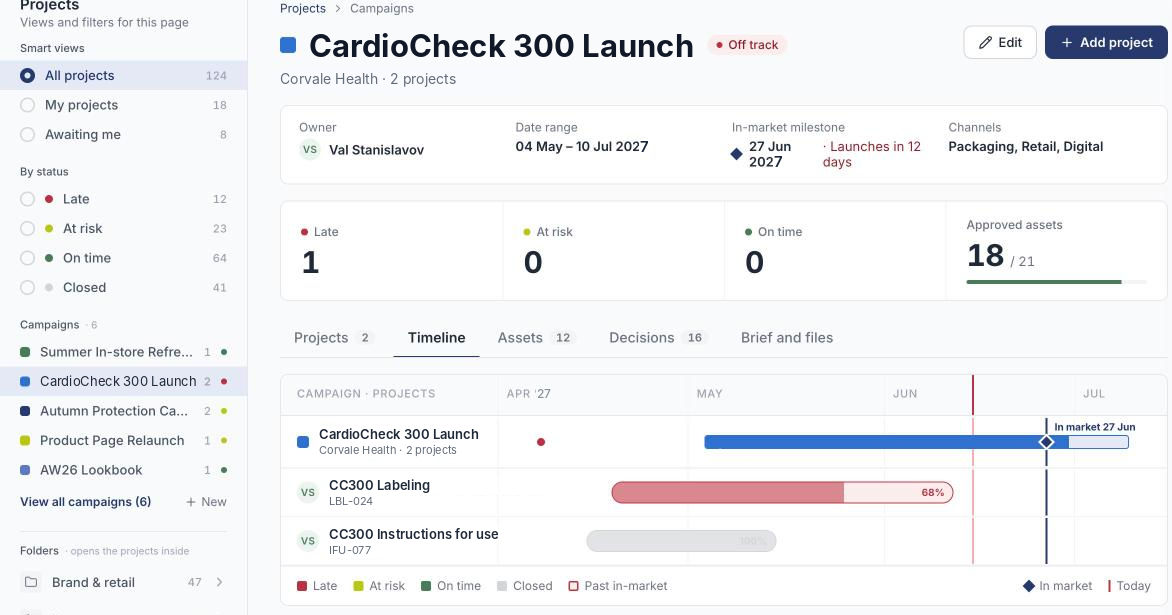
Figure 1. Aproove plots each project against the in-market date on the campaign timeline. The labeling project is 68 percent complete and late, 12 days before launch.
The project manager runs each project on a project plan that covers production and approval, with packaging, the manual, marketing and video as parallel branches. Each project starts from an intake form or an API call, and Aproove reads the intake fields (product, SKU, market, material type) to name the file and choose the workflow. Aproove routes a unit package to regulatory, quality, legal and the printer, and a social ad to marketing and legal.
The Compliance Hub stores approved claims, supplier information and compliance content by SKU
The Compliance Hub stores each approved claim, supplier fact and compliance statement as a versioned record (a Hub record) tied to the products and SKUs that the record applies to. One claim can apply to many SKUs. Regulatory, legal and product teams add Hub records by hand, or the Hub receives Hub records through the API from a claims system or a quality system. A private-label distributor's suppliers submit product information through intake forms as named guests, and the distributor's product team approves each fact before anyone builds the label.
Aproove attaches the Hub records for a project's SKUs to the project. The designer of the German package and the reviewer of the German package both see the approved German claim wording, the importer's address and the current battery statement beside the draft in the viewer. When a reviewer approves a file, Aproove records the version of every Hub record that the file contains.
AI agents compare each draft with the Hub records, and reviewers decide
AI agents read each file before a reviewer opens the file. A claims agent compares each claim with the approved wording in the Hub, a compliance agent checks that required warnings and symbols are present, and a barcode agent decodes each barcode. Each agent leaves a tagged note on the page, and Aproove lists every open finding in the Compliance Hub with the finding's severity and owner.
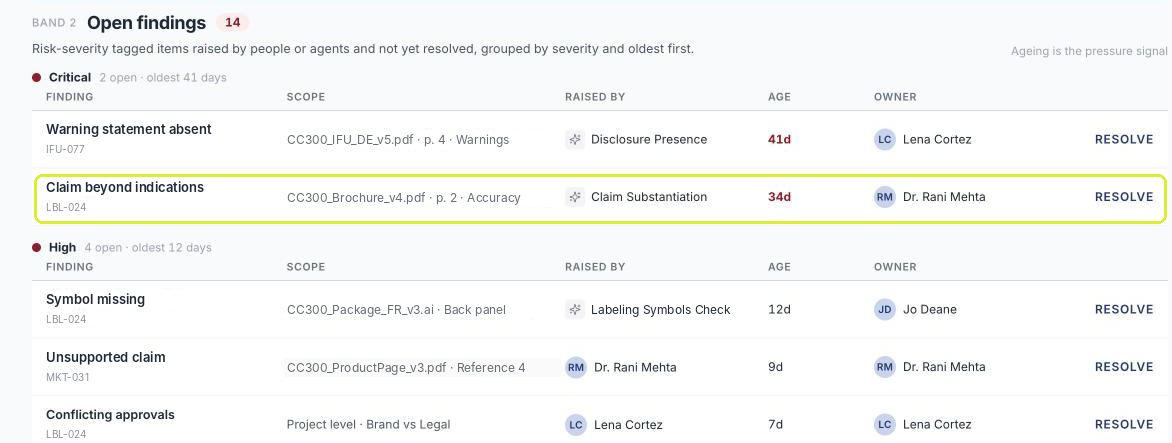
Figure 2. Open findings raised by agents and reviewers, grouped by severity. The claim substantiation agent flagged a brochure claim that goes beyond the approved wording.
A reviewer accepts or rejects every agent note, and Aproove moves the file to the next step only after the reviewer decides. Aproove applies the same human-in-the-loop rule to every agent.
Reviewers choose who sees the next draft with each decision
Every reviewer ends a task with a decision. A reviewer who chooses Approve leaves later rounds. A reviewer who chooses Approve with changes sends the file back to its author. A reviewer who chooses Second draft required sends the file back and joins the next round, so the technical writer never builds a new review form. An administrator can require an electronic signature that meets 21 CFR Part 11 at any step that needs a binding sign-off.
Aproove marks the pages that changed between versions, so a reviewer of a 60-page manual reads only the changed pages. Suppliers, printers, agencies and translators join as named guests at no license cost, and Aproove records each guest's decision in the audit trail under the guest's own name.
Aproove lists every approval in the launch on one tab
On the campaign's Decisions tab, Aproove lists every approval and change request in the launch, with the person, the file, the version and the time. When a project closes, Aproove archives the files, notes and decisions to the system the team names.
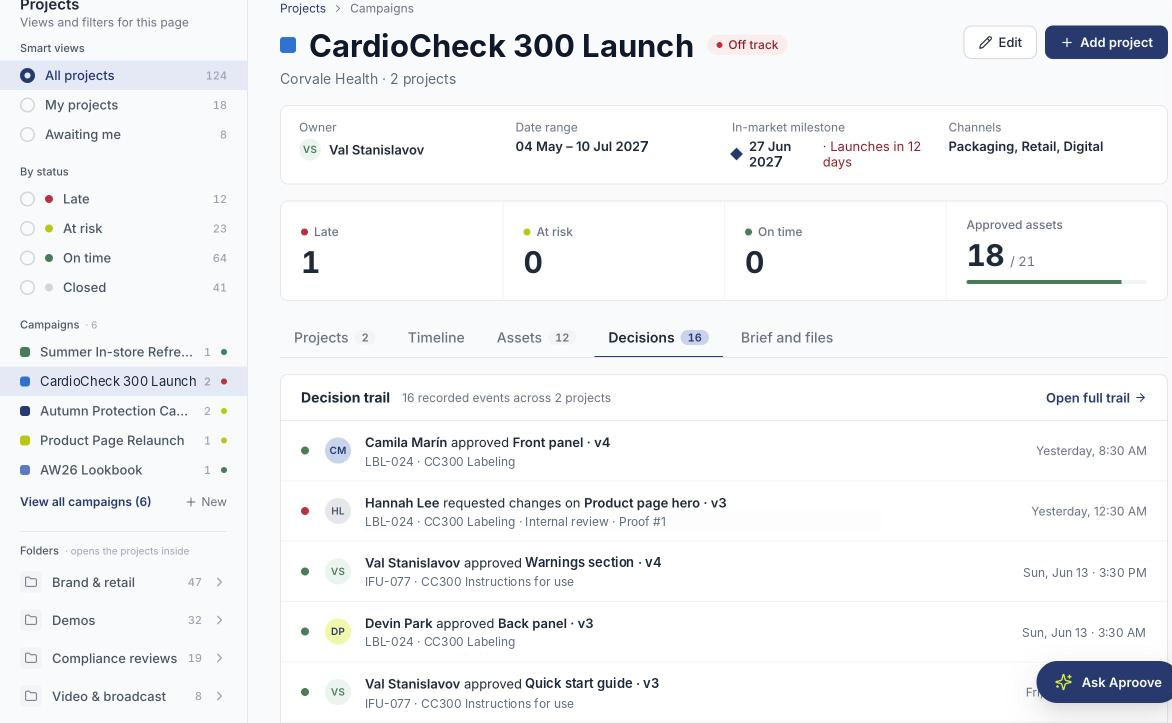
Figure 3. Aproove records every decision across the packaging and manual projects on the Decisions tab, and links each decision to the project history.
When regulatory changes or withdraws a Hub record, Aproove lists in the Compliance Hub every approved file that contains the old version, and the owner of each file decides whether to revise or withdraw the file. For an audit or a retailer inquiry, the compliance lead builds an audit pack for one class of material and one period, and Aproove lists in the pack's manifest any required check that never ran.
Aproove connects to the claims, content and quality systems you already run
A company that keeps claims in a claims system, manuals in a component content management system and labeling in a quality system keeps all three systems. Aproove pulls approved claims by ID through the API when a project opens. When the project closes, Aproove sends back the approved files, the claims each file contains and the decision record.
FAQs
What is approval workflow software?
Approval workflow software sends a file or document to the people who must review the file, records each reviewer's decision, and moves the file to the next step based on those decisions. Review and approval software for regulated content also compares versions, keeps an audit trail of every decision, and can require electronic signatures.
What is the best approval workflow software for a product launch?
Choose by the kinds of material your launch produces. A team that approves only marketing assets can choose an online proofing tool. A team whose launch also produces packaging, manuals and video needs approval workflow software that runs every material in one plan, checks each draft against approved claims and supplier facts, and keeps one decision record. Regulators and retailers set different requirements by industry and market, so test each tool against one of your own launches.
How do companies keep product claims consistent across packaging, manuals and marketing?
Legal or regulatory approves each claim once and stores the claim in one source. Reviewers see the approved wording beside every draft, and the approval workflow software records which claims each approved file contains. When a claim changes, the claim owner reads that record to find every affected package, manual page and asset.
Can suppliers and printers approve artwork without an Aproove license?
Yes. Suppliers, printers, agencies and translators join as named guests at no cost on every Aproove pricing tier, open their tasks from an email, and record decisions under their own names. Your quality team decides whether a supplier's decision counts as a formal approval.