
A field marketing organization (FMO) holds contracts with Medicare Advantage and ACA carriers on one side and with hundreds of agencies and thousands of independent agents on the other. Each agency sells with its own call scripts, social ads, mailers and landing pages. Every one of those pieces goes through the CMS marketing material approval process before an agent uses the piece, and each carrier holds the FMO responsible for the pieces that name the carrier's plans.
An FMO's compliance team therefore does two jobs. The team writes compliant marketing and communications materials and publishes the materials for agents to use. The team also reviews the materials that agencies write for themselves, returns feedback, and files each approved piece with the carriers and in HPMS before any agent can use the piece.
Agents submit the most pieces in the months before each Annual Enrollment Period (AEP). A national FMO's compliance team told us in November 2026 that the team reviewed 350 to 400 pieces a month before AEP, and agents submitted every piece by email. One call center in that FMO's downline, which also sells leads, sent about 300 pieces in a single batch, and the team reviewed and filed each piece by hand.
This article covers the approvals each piece of agent marketing needs, the steps where analysts who work from email cannot review pieces as fast as agents submit pieces, and how an FMO can run intake, AI checks, carrier review, HPMS filing and distribution in one system with one record of every decision.
Table of Contents
- Agent marketing needs FMO review, carrier pre-approval, HPMS filing and carrier opt-in
- Agencies send their marketing to the FMO by email, one piece or one zip file at a time
- Each carrier reviews the same piece separately, and two carriers can ask for opposite changes
- FMO staff file each multi-plan piece in HPMS by hand and record every carrier's opt-in
- Analysts search five systems to answer an auditor's request for an FMO's review history
- When an FMO asks agents to submit every piece, agents send more pieces to the same analysts
- Signs that your FMO's CMS marketing material approval process will not keep up through AEP
- Aproove runs FMO intake, carrier review and HPMS filing in one system
- FAQs
Agent marketing needs FMO review, carrier pre-approval, HPMS filing and carrier opt-in
CMS holds each Medicare Advantage organization (carrier) responsible for the marketing done by the carrier's third party marketing organizations (TPMOs) under 42 CFR 422.2274(g). CMS requires each carrier to write four duties into the carrier's contract with each TPMO: disclose subcontractors, record marketing and sales calls and keep the recordings for six years, report staff disciplinary actions monthly, and use the TPMO disclaimer. An FMO is a TPMO, so each carrier writes those duties into the carrier's contract with the FMO, and the FMO writes the same duties into its contracts with every agency in the FMO's downline.
A piece that names more than one carrier's plans (a multi-plan piece) needs four sign-offs, in this order.
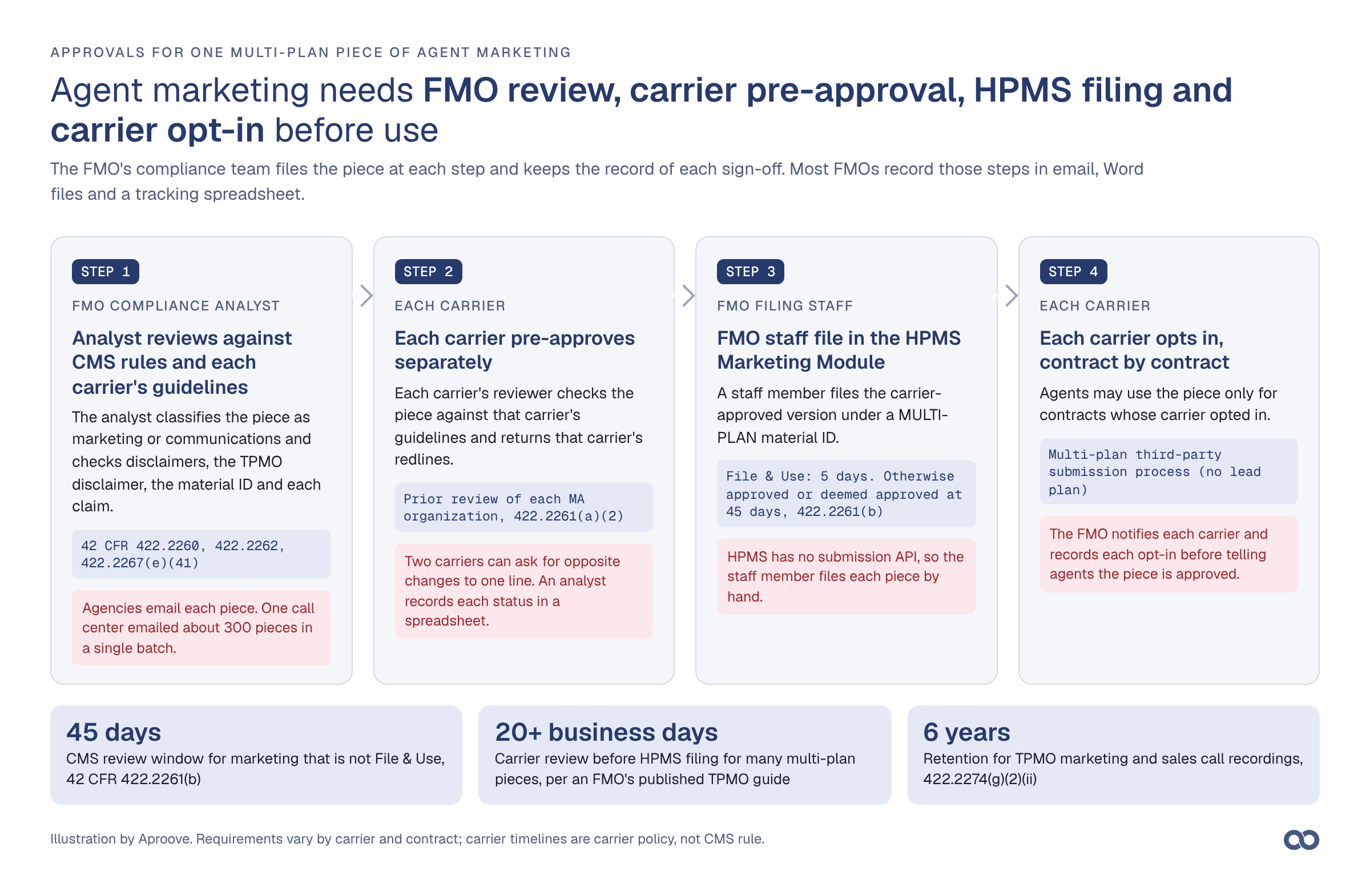
Figure 1. The four sign-offs a multi-plan piece of agent marketing needs. FMO staff file the piece and keep the record at each step.
Step | Who acts | What they do | Rule or source |
|---|---|---|---|
1. FMO compliance review | FMO compliance analyst or director | Classifies the piece as marketing or communications; checks required disclaimers, the TPMO disclaimer, the material ID and each claim | |
2. Carrier pre-approval | A compliance reviewer at each carrier named in the piece | Checks the piece against that carrier's guidelines, logo rules and plan wording | 422.2261(a)(2): prior review by each MA organization |
3. HPMS filing | An FMO staff member with HPMS access granted by a carrier | Files the piece under a MULTI-PLAN material ID | 422.2261(a)(1) and (b): use after 5 days under File & Use, otherwise after approval or deemed approval at 45 days |
4. Carrier opt-in | Each carrier, contract by contract | Opts in or out of the piece for each of its contracts | CMS multi-plan TPMO submission process (Integrity FAQ) |
Carriers opt in contract by contract because CMS retired the lead plan process, in which one carrier filed for the others. Integrity's TPMO marketing FAQ describes the current process: after CMS accepts a multi-plan piece, each affected carrier opts in or out, and a TPMO may use the piece only for contracts whose carrier opted in. The same FAQ says many carriers take 20 business days or longer to pre-approve a piece.
Agencies send their marketing to the FMO by email, one piece or one zip file at a time
Most FMOs receive agent marketing in a shared compliance inbox. An agency emails one piece, or a zip file of thirty, with no standard fields for plan year, line of business, carriers, states or the proposed material ID. A compliance analyst opens each attachment, identifies the material type, logs the piece in a spreadsheet or as a CRM case, and starts the review.
Some FMOs log one CRM case per email, so an analyst who reviews an email of twenty pieces closes one case. When a call center or lead vendor sends 300 social ads, landing pages and scripts in one email, the analysts complete 300 reviews, check 300 material IDs and, for multi-plan pieces, make 300 HPMS filings.
Analysts check each piece against the Medicare Advantage marketing rules in 42 CFR 422 Subpart V and CMS's Medicare Communications and Marketing Guidelines (MCMG). CMS announces changes to the guidelines and to the HPMS Marketing Module in HPMS memos, so CMS can change what analysts check for during a plan year.
Most pieces from one agency show the same TPMO disclaimer, customer service number and footer. An analyst still reads that text on every piece, because 42 CFR 422.2262(c)(1)(i) requires the hours of operation to appear at least once wherever a customer service number appears. CMS also changed the TPMO disclaimer at 422.2267(e)(41) in the CY 2027 final rule of April 6, 2026: TPMOs must now read the disclaimer within the first minute of a call, and the disclaimer no longer lists SHIPs as an information source.
Each carrier reviews the same piece separately, and two carriers can ask for opposite changes
A call-center and lead-generation distributor we spoke with in October 2026 counted 10 to 15 review rounds per piece, carrier rounds included. The distributor's two largest carriers reviewed each piece independently and sometimes asked for conflicting changes to the same line. The distributor's team merged the two sets of redlines into one revision and sent the revision back to both carriers.
Each carrier also publishes its own marketing guidelines, which can go beyond the CMS rules. In the CY 2027 rule, CMS removed its restriction on superlatives, according to the Georgetown Center on Health Insurance Reforms. Humana still requires, in its external marketing guidelines, current or prior contract year data, cited in the piece, for words such as "best" and "#1." An FMO analyst therefore checks a two-carrier piece against three sets of rules: the CMS rules and each carrier's guidelines. Carriers revise their guidelines on their own schedules, and one national FMO told us that a large carrier sends revisions monthly.
Carriers also set the file format. In the same guidelines, Humana requires an editable Word document with changes tracked, treats images as reference only, and requires the material ID filed in HPMS to match the ID printed on the piece. The distributor above converts every piece, including connected TV storyboards and landing pages, to Word to meet Humana's format rule, and saves each revision as a new Word file attached to a comment thread.
Most carriers accept a pre-approval request by email with the files attached. A few carriers require the FMO to upload the piece to the carrier's own portal, and the carrier's review comments then stay in that portal, outside the FMO's records.
FMO staff file each multi-plan piece in HPMS by hand and record every carrier's opt-in
After the carriers approve a multi-plan piece, an FMO staff member files the piece in the HPMS Marketing Module, which 42 CFR 422.2261(a)(1) names as CMS's primary system of record for marketing materials. Under 422.2262(d) the material ID reads MULTI-PLAN, then a string the FMO chooses, then M for marketing, as in MULTI-PLAN_LMA0147_M. A piece filed under File & Use may run five days after filing. Other marketing pieces wait for CMS approval, or for deemed approval after 45 days.
HPMS has no submission API, so the staff member files each piece and downloads each acceptance by hand. The FMO then notifies each carrier that the piece is in HPMS, records each carrier's opt-in, and tells the agent which plans the piece may promote. At the end of the plan year, FMO staff deactivate each expired piece in HPMS and tell every agent who uses the piece to stop.
Analysts search five systems to answer an auditor's request for an FMO's review history
When a carrier audits its TPMOs, or CMS audits the carrier, the FMO must show which pieces the FMO reviewed, who approved each piece, which version each carrier approved, when FMO staff filed the piece in HPMS, and which contracts opted in. An FMO that works by email keeps those facts in five places: the compliance inbox, the Word attachments, the carrier email threads, the HPMS downloads and the tracking spreadsheet. An analyst rebuilds each piece's history by matching records across all five by hand. Aproove calls the gap between knowing that a review happened and proving how the review happened the Reconstruction Fog.
Proof of compliance describes what an approval record must show an auditor and how a compliance team exports one.
In an Aproove survey of 100 marketing leaders in 2025 and 2026, 27% named maintaining audit trails as a persistent problem and 21% said manual approvals are too slow for AEP timelines (Medicare and managed care).
When an FMO asks agents to submit every piece, agents send more pieces to the same analysts
FMO compliance teams know that agencies do not submit everything the agencies publish. Agencies build their own flyers, social posts and landing pages, and lead vendors build landing pages that the FMO never reviews. The Senate Finance Committee's majority staff reported that CMS logged 15,497 marketing complaints in 2020 and 39,617 in 2021, a 2021 count that excluded December (Senate Finance Committee). For ACA plans, the 2027 rule at 45 CFR 155.220(j) makes agents and brokers responsible for marketing that others create on the agents' and brokers' behalf, and our ACA article covers that rule.
Each time an FMO asks agents to submit more of their material, agents send more pieces to the same inbox and the same analysts. A team that reviews 400 pieces a month by hand cannot review 1,000 with the same staff.
Signs that your FMO's CMS marketing material approval process will not keep up through AEP
Check your team against these conditions:
- Agents submit by email, and an analyst types each submission into a tracker.
- A batch of 300 pieces arrives as one email with one subject line.
- Analysts check the same TPMO disclaimer and footer by eye on every piece.
- One analyst records each carrier's status in a spreadsheet column.
- An analyst merges two carriers' redlines in a third Word file.
- Nobody can list, within an hour, every piece filed in HPMS for one carrier this plan year and the contracts that opted in.
- Analysts find expired pieces by searching email for the plan year.
If three or more of these conditions describe your team, your team can review only as many pieces as your analysts can read before AEP, and you can show an auditor only the decisions someone saved from email.
Aproove runs FMO intake, carrier review and HPMS filing in one system
Aproove is the audit-ready workflow platform for regulated content. When an FMO runs the CMS marketing material approval process in Aproove, Aproove opens one project for each submission, from the agent's upload to the approved piece, and records every reviewer's decision in that project. The figures below use sample data and fictional carriers.
1. Agents submit through a form, and the form opens the project
Agents submit through a form that the FMO places on its agent portal or website. The form sends each submission to Aproove through a webhook, which an FMO's developers can usually connect in a day or two, and the form shows the FMO's own branding. The form requires plan year, line of business, material type, carriers, states and the proposed material ID, and Aproove uses those fields to choose the workflow steps: Aproove skips HPMS filing for a Medicare Supplement ad and adds a director review for a TV script.
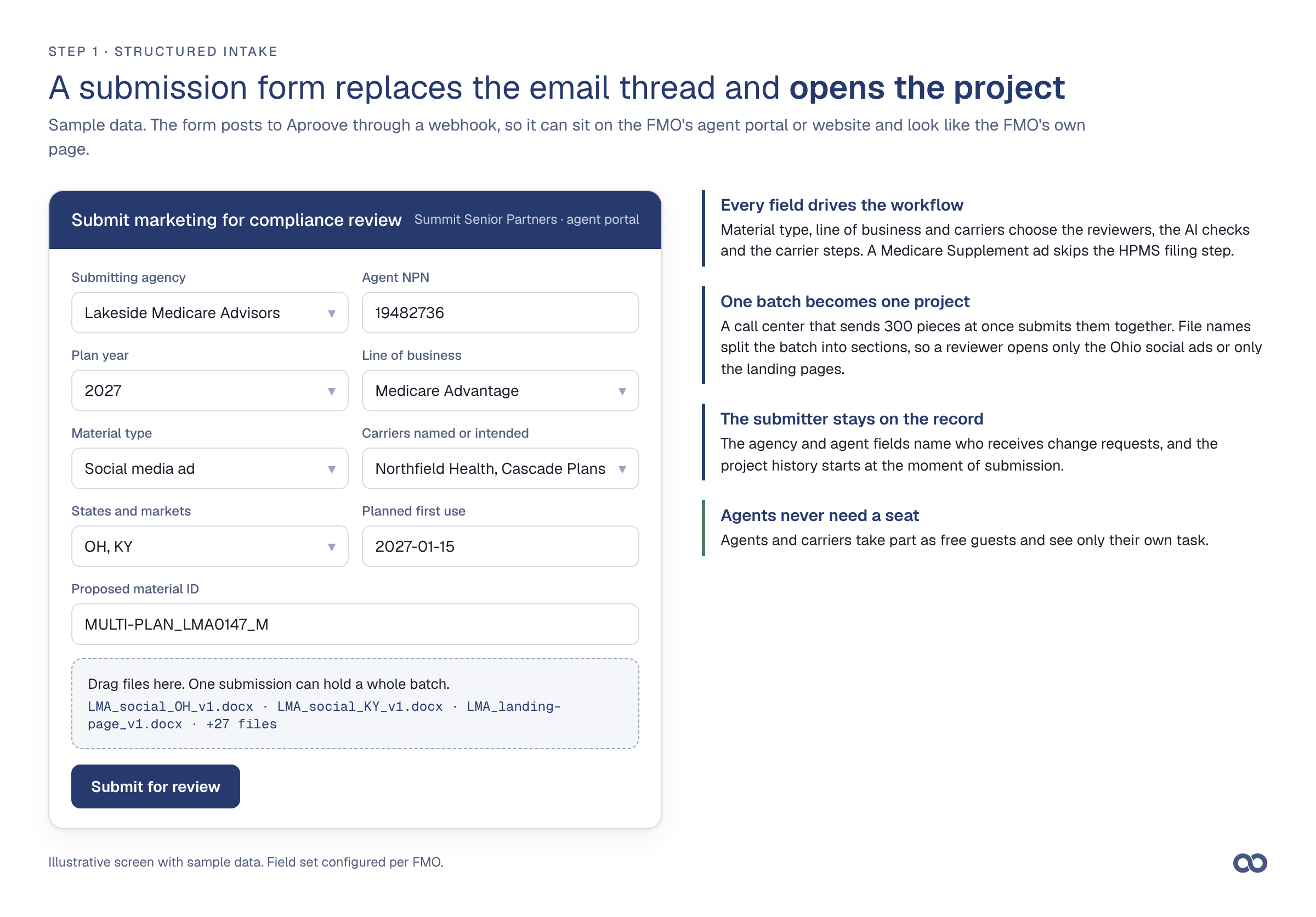
Figure 2. The submission form. One submission can hold a whole batch.
Aproove opens one project for a 300-piece batch from a call center and sorts the files into sections by file name, so a reviewer can open only the Ohio social ads or only the landing pages.
2. AI agents check each piece against CMS rules and carrier guidelines before an analyst opens it
AI agents read every page when a piece arrives. Each agent runs one check, tags the page where the agent finds a risk, and writes a note with the finding, the rule or guideline behind the finding, and a suggested fix. Checks an FMO can run include missing hours of operation beside a customer service number, outdated TPMO disclaimer text, a material ID that differs from the intake form, two different phone numbers on one page, and superlatives that a carrier's guidelines restrict.
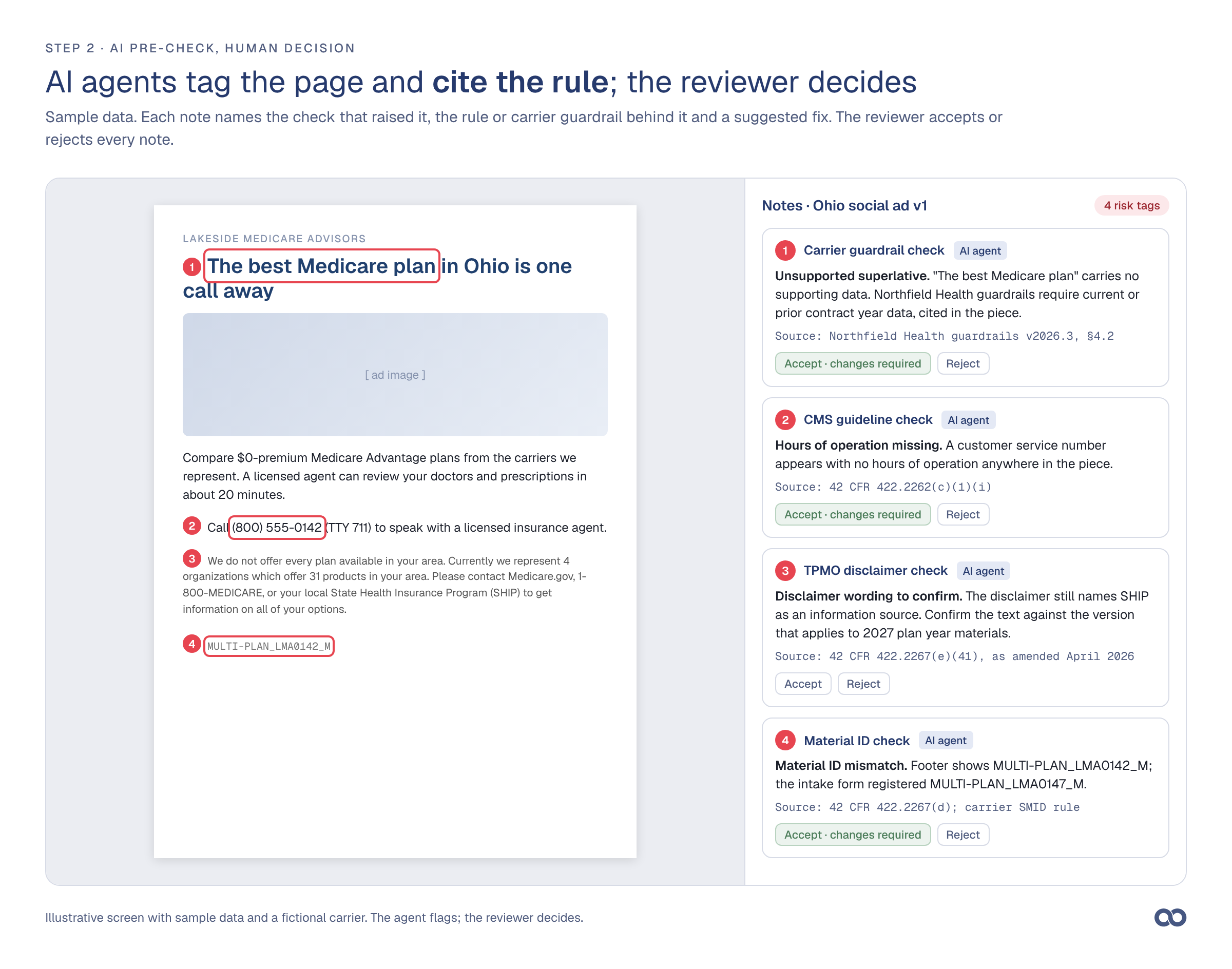
Figure 3. AI agent notes on a sample ad. Each note names its source, and the analyst accepts or rejects each note.
The FMO sends Aproove the guidelines, Aproove's team writes each guideline as a flag condition at the threshold the FMO chooses, and the FMO's compliance team tests the checks before launch. Aproove's Compliance module stores each carrier's guidelines with a version number. When a carrier sends a revision, the compliance lead uploads the revision as a new version, and every check from then on uses the new version. The FMO can run the checks on an AI provider that the FMO already contracts with.
An AI agent flags each risk, and a compliance reviewer accepts or rejects every flag, under Aproove's human-in-the-loop model.
AI review agents lists the checks Aproove's agents run and how Aproove governs each agent.
3. Aproove sends each piece to the reviewer that the analyst's decision names
Each analyst ends a review task with a decision, and Aproove sends the piece to the step that the decision names. An analyst approves a low-risk piece, sends changes back to the agent, or escalates the piece to the compliance director. Aproove sends every TV script, and every piece with a high-risk tag, to the director. An analyst who wants a second opinion mentions a colleague in a note on the page, and the colleague's answer stays in the project record.
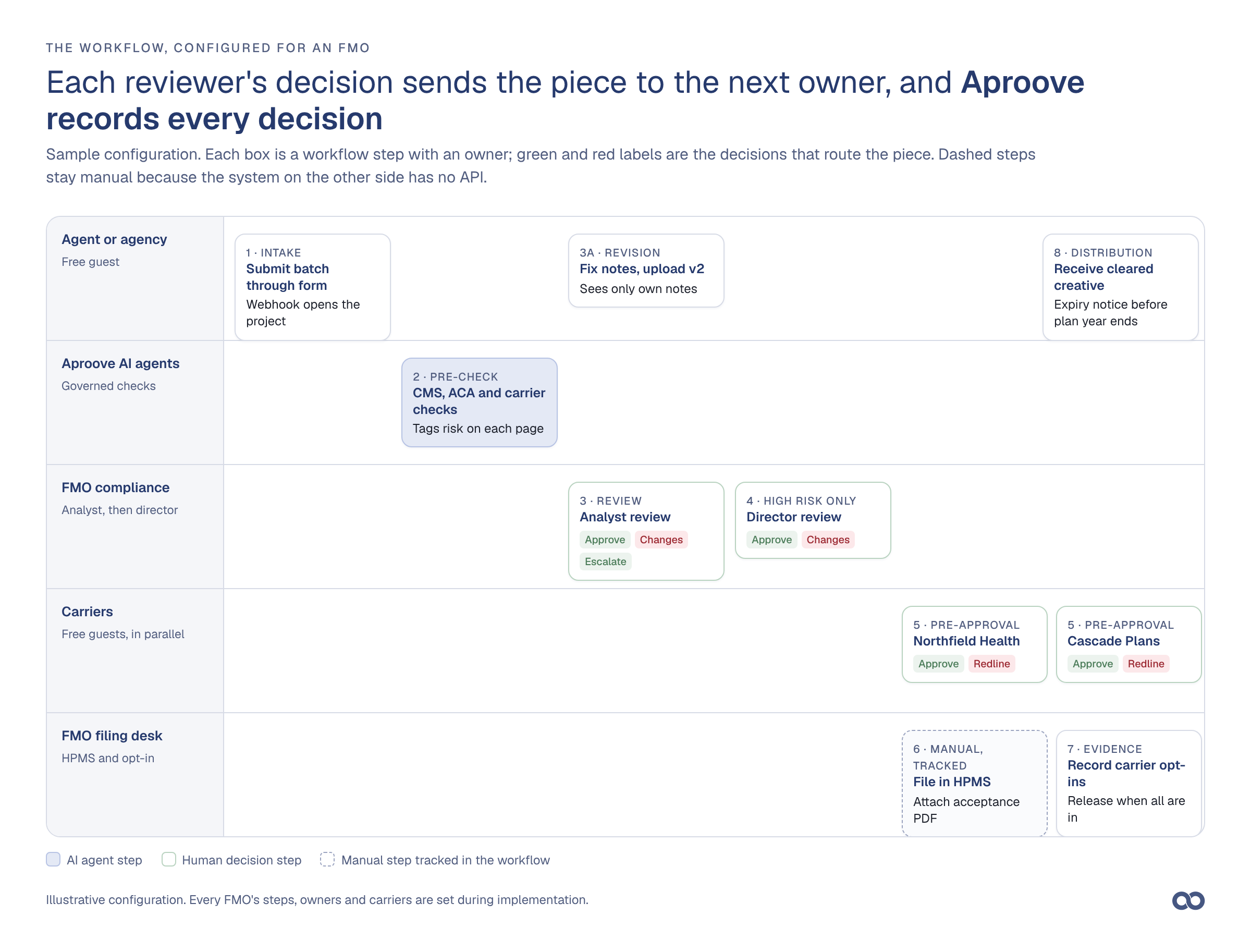
Figure 4. One configuration of an FMO workflow in Aproove. Dashed steps are manual tasks that Aproove assigns and records.
4. The agent receives the notes and uploads version 2 to the same project
When an analyst decides that a piece needs changes, the agent receives a task email with the analyst's notes and uploads a corrected file to the same project. Smart version comparison marks every word and pixel that changed between version 1 and version 2, and the analyst checks those changes without rereading the piece. Agents work in Aproove as free guests and see only their own task.
5. Each carrier reviews the approved version at the same time
After the FMO approves a piece, Aproove sends the piece to each carrier in parallel. A carrier reviewer either opens the piece in the browser as a free guest and marks up the piece, or receives the files by email in the carrier's required format; Aproove then imports the carrier's returned Word or PDF redlines into the project. Annotation flow management hides internal notes and earlier versions from carrier reviewers, so each carrier sees only the latest approved version. Where a carrier accepts uploads to its portal through a connection, Aproove uploads the piece; where a carrier does not, an FMO staff member uploads the piece as a task that Aproove records.
Aproove shows both carriers' redlines on the same page of the same project, so the analyst merges the redlines once and sends one revision to both carriers.
6. FMO staff file in HPMS, and Aproove records the acceptance and each opt-in
HPMS has no submission API, so a person still files each piece. Aproove assigns the filing as a task with the approved file and material ID attached, and the staff member attaches the HPMS acceptance to the project. In the next step the staff member records each carrier's opt-in with the carrier's confirmation, and Aproove releases the piece only when every carrier named on the form has opted in. If CMS publishes a submission API, Aproove can replace the manual filing task with an integration.
7. Aproove sends approved pieces to agents and shows every submission's status in one view
When the last carrier opts in, Aproove sends the agent, or a distribution list of agents, the approved files and the list of plans each piece may promote. Before the plan year ends, Aproove reminds each agent that the agent's approved pieces expire and gives FMO staff a list of pieces to deactivate in HPMS. Aproove then archives the project with the project's full audit trail.
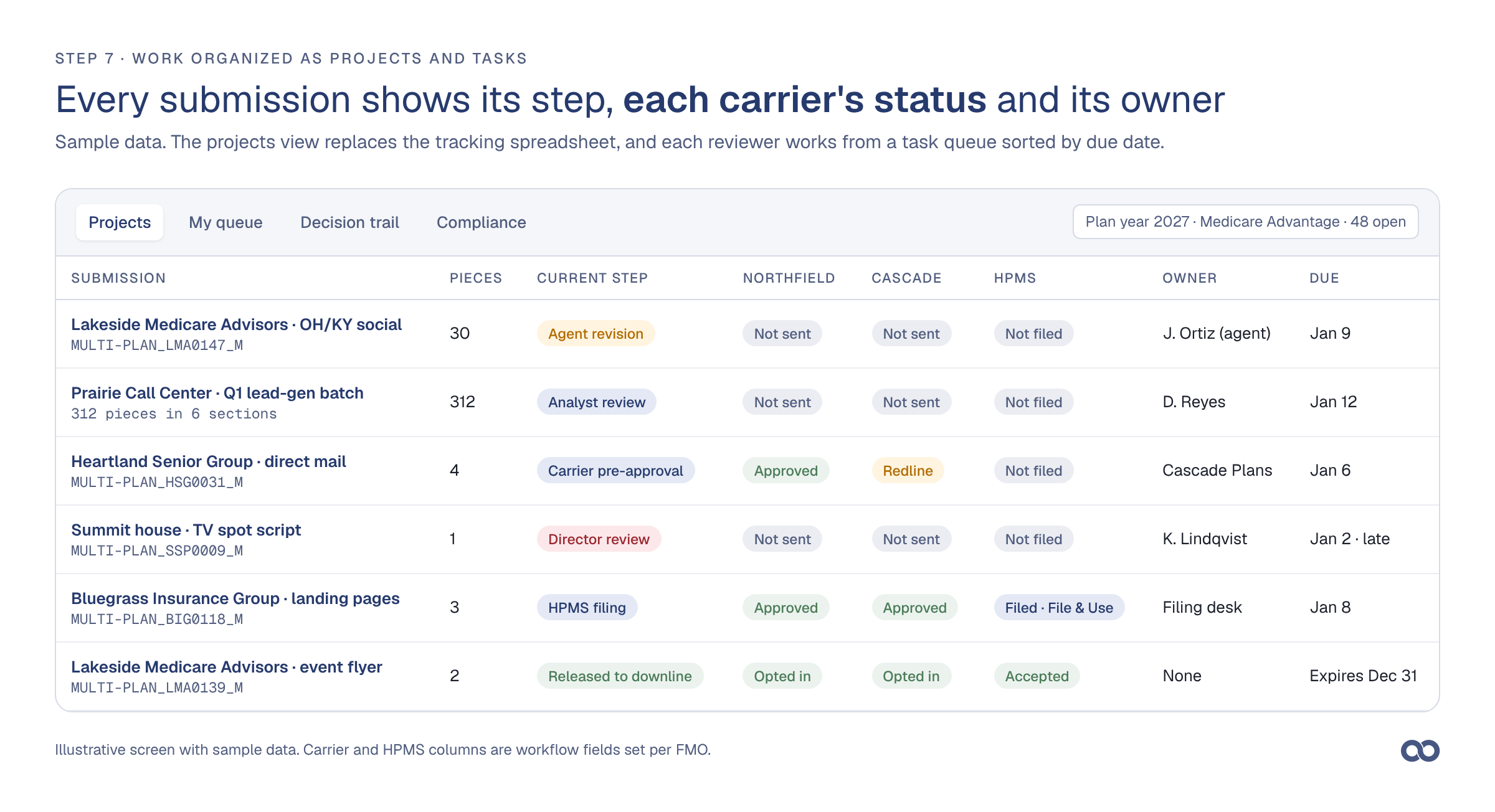
Figure 5. The projects view lists each submission's current step, each carrier's status and the owner.
The projects view shows, for every open submission, the current step, each carrier's status, the HPMS status, the owner and the due date, and each reviewer works from a task queue sorted by due date. When an auditor asks for one piece's history, the compliance lead exports the project's decision record.
FAQs
What is the CMS marketing material approval process?
The CMS marketing material approval process is the set of reviews and filings that a Medicare Advantage or Part D marketing piece goes through before anyone uses the piece. The plan sponsor, or a TPMO after each sponsor's review, files the piece in the HPMS Marketing Module. A File & Use piece may run five days after filing; CMS approves other marketing pieces, or the piece is deemed approved after 45 days (42 CFR 422.2261). For agent-created multi-plan pieces, FMO review and each carrier's pre-approval come before filing, and each carrier's opt-in comes after.
What software do FMOs use to review agent marketing for Medicare compliance?
Many FMOs still use a shared inbox, Word files with tracked changes, and a spreadsheet or CRM case for status. With review software built for FMOs, agents submit through a structured form, AI agents check each piece against CMS rules and each carrier's guidelines, the FMO sends carrier pre-approvals in parallel, staff record HPMS filing and each opt-in, and the compliance lead exports each piece's decision record. Aproove covers each of those steps, and agents and carrier reviewers use Aproove free as guests.
How does an FMO get agent marketing approved by carriers and CMS?
The FMO's compliance team reviews the piece against CMS rules and each carrier's guidelines and sends the piece to each carrier for pre-approval. FMO staff then file each carrier-approved multi-plan piece in the HPMS Marketing Module and record each carrier's opt-in for the carrier's contracts. Agents may use the piece only for contracts whose carrier opted in. Each carrier can add steps through its contract and guidelines, so confirm the process with each carrier.
Who submits multi-plan TPMO marketing materials to HPMS?
Under 42 CFR 422.2261(a)(2), a TPMO may submit materials it developed for multiple MA organizations, after each organization has reviewed the materials. Only people a plan has authorized for HPMS access can file, and each plan then opts in or out for its own contracts. CMS no longer uses a lead plan to submit on behalf of others.
Can AI check Medicare marketing against CMS rules and carrier guidelines?
AI agents can flag likely issues such as missing hours of operation, outdated TPMO disclaimer text, mismatched material IDs and claims that a carrier's guidelines restrict, and cite the rule behind each flag. A compliance reviewer still decides every flag. CMS changes its requirements each plan year and each carrier writes its own, so an FMO needs a versioned set of checks for each carrier, tested by the FMO's compliance team.
Does Aproove submit materials to HPMS?
No. HPMS does not offer a submission API, so an FMO staff member files each piece by hand. Aproove assigns the filing as a tracked task, keeps the approved file and material ID ready, and stores the HPMS acceptance and each carrier's opt-in with the project record.
Do agents and carrier reviewers need an Aproove license?
No. Agents, agencies, lead vendors and carrier reviewers review as free guests, open their task from an email, and see only that task.