A state insurance examiner asks an insurer for proof of compliance on page 2 of the California version of its annuity illustration insert: who approved the page, on which version, and why.
The insurer's marketing team answers from four places. The workflow tool exports a CSV of status changes and timestamps. The proofing tool exports a PDF of reviewer comments. A shared folder holds versions 1 through 5 of the insert. An email thread holds the compliance reviewer's sign-off. Every fact the examiner needs exists, and no single file shows the decision.
A team member then joins the four files by hand. The team member matches each comment to a version, finds the version the compliance reviewer approved, and checks whether anyone signed the approval. The team member also has to explain why legal counsel rejected version 5 after compliance had approved version 3.
Proof of compliance for regulated content is the record that joins the comment, the version and the decision at the moment the reviewer decides. A team that captures the joined record during review turns the examiner's request into one export, and the export names the parts of the record that are still incomplete.
Table of contents
- Proof of compliance ties a named decision to a specific version and a stated reason
- Auditors read comments, versions and decisions as one record
- A readable approval record answers the auditor on one screen
- A decision record shows the version, the reason and the evidence the reviewer had open
- Exception flags list the irregular decisions before an auditor searches for them
- Aproove exports proof of compliance with the filter stated on the export
- The control coverage matrix shows which required controls ran and which did not
- The audit pack manifest states what the evidence leaves out
- Seven questions test whether your approval record can serve as proof of compliance
- Aproove records proof of compliance at each decision
- Frequently asked questions
An activity export, a decision record and an evidence pack answer different audit questions
Activity export | Decision record | Evidence pack | |
|---|---|---|---|
Unit of record | One row per event | One record per decision | One package per scope and period |
What the reader learns | Who acted and when | Who decided, on which version, for what reason, with which findings open | The decisions, signatures, comments and control results for a defined scope |
Comments and versions | Stored in separate files | Attached to the decision each comment informed | Included beside the decisions they support |
Exceptions | Left for the reader to find in the rows | Flagged on the record | Listed in a legend and in the manifest |
Gaps in evidence | Not stated | Shown as flags | Stated in the manifest |
Proof of compliance ties a named decision to a specific version and a stated reason
Proof of compliance for a regulated approval is a record that shows who made the decision and under what authority, which version and page the decision applied to, what the reviewer decided and why, which required checks ran beforehand, and which findings were still open when the reviewer decided.
Each regulator describes the record in its own terms. For electronic records, 21 CFR 11.10(e) requires secure, computer-generated, time-stamped audit trails, and 21 CFR 11.50(a) requires each signed record to show the signer's printed name, the date and time of signing, and the meaning of the signature, such as review or approval. FINRA Rule 2210(b)(4)(A) requires a member firm to record the name of the principal who approved a communication and the date of approval. Under File and Use at 42 CFR 422.2261, a Medicare Advantage organization certifies its own marketing material, so the plan's internal approval record is the evidence behind each certification.
State insurance regulators set the same expectation for advertising. In states that adopted the NAIC Advertisements of Life Insurance and Annuities Model Regulation, Section 3.B requires an insurer to maintain a system of control over the content, form and method of dissemination of every advertisement, and Section 9.A requires the insurer to keep a file of its advertisements open to inspection by the insurance department for five years after the insurer stops using each advertisement.
All five rules ask the regulated firm to show who approved which content and when, from a record the firm controls. Retention periods and record formats still differ by regulator and record type, so each compliance team confirms the rules for its own program.
Auditors read comments, versions and decisions as one record
An auditor reads comments, versions and decisions together because each one answers a different part of the auditor's question. A comment without a version number cannot show whether the issue the reviewer raised survived into the approved file. A version without its comments cannot show why the team produced version 5. A decision without either shows a name and a time.
When comments live in a proofing tool, versions in a file store and approval status in a workflow tool, an auditor's request for a marketing team's approval history sends a team member into all three systems to match the records by hand.
In an Aproove survey of 100 marketing leaders conducted in 2025 and 2026, 27% named maintaining audit trails as a persistent problem, and 27% said they struggle to verify CMS compliance across materials (Medicare and managed care). The Reconstruction Fog explains how the reasoning behind a decision separates from the files in the months after approval. A record that holds the comment, the version and the decision together from the moment of decision keeps the reasoning attached.
A readable approval record answers the auditor on one screen
A readable approval record answers the auditor's question on one screen, with no second system. The Decision trail in Aproove's compliance and audit workspace lists one decision per row and derives each row from the project history, which remains the complete record of authority. Each row links back to its entry in the project history. The examples in this article come from the Aproove Decision Workspace with sample project data, so the project, reviewers and dates are illustrative. The approval records and evidence export page shows the same sample project inside the product.
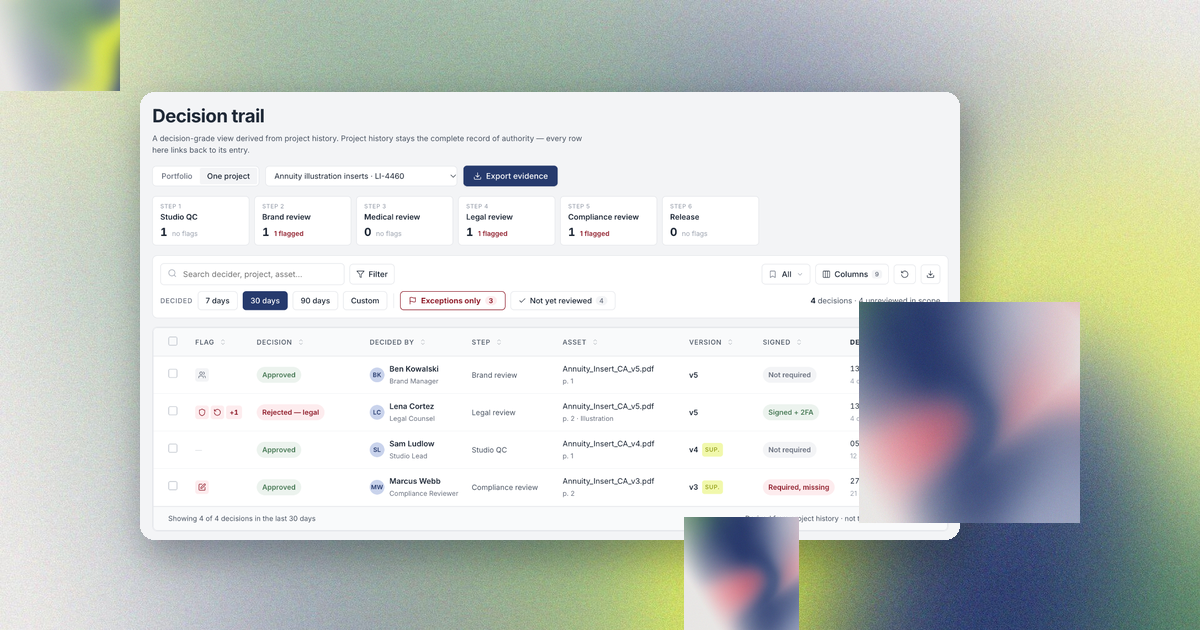
The one-project view narrows the Decision trail to the project the examiner asked about. For the Annuity illustration inserts project (LI-4460), the view lists the six workflow steps with the number of decisions and exception flags at each step. Studio QC holds one decision with no flags. Brand review, legal review and compliance review each hold one flagged decision. Medical review and release hold no decisions yet. Below the steps, four reviewers' decisions cover versions 3, 4 and 5 of the California insert.

A decision record shows the version, the reason and the evidence the reviewer had open
When a compliance lead opens a decision in the Decision trail, Aproove shows the full decision record. For the compliance approval of version 3 of the California insert, the record shows the following facts.
- Marcus Webb, the compliance reviewer, approved version 3 at the compliance review step on July 27, 2026.
- The decision applies to page 2 of Annuity_Insert_CA_v3.pdf in the Annuity illustration inserts project, and the record marks version 3 as superseded by a later version.
- The reviewer selected the reason "Meets requirements" from a picklist and entered the free text "Signature step skipped during migration."
- The step's policy required an e-signature, and the record carries a Signature missing flag because Aproove captured no signature.
- The record lists what the reviewer had open at the moment of decision: the studio lead's note on the version 3 upload with the page 2 correction, the confirmation four hours earlier that all prior-round comments were addressed, and the result of the AI claim-to-reference check, labeled AI generated and marked cleared before the decision.
- The record shows that the compliance review step routed the file to release to production.

Version 3 is no longer the current version of the insert. The studio produced versions 4 and 5 after the compliance approval, legal counsel rejected version 5, and the project sits at the compliance review step again, so no version of the insert has been released.
The examiner reads the compliance approval, the missing signature and the reviewer's own explanation of the missing signature in one record. Aproove labels the AI check as AI generated and stores the check's state at the moment of decision. The named reviewer owns the decision. The AI agent flags the issue, and the human reviewer decides.
Exception flags list the irregular decisions before an auditor searches for them
An auditor looks for exceptions first. A set of records that shows only clean approvals prompts the auditor to ask what the set leaves out. A set of records that flags its own exceptions, with an explanation on each flag, shows that the compliance team found the exceptions first.
Aproove flags eight exception types on the decision record.
Exception flag | What the flag records |
|---|---|
Signature missing | The step's policy required an e-signature, and the reviewer did not sign |
Version superseded | A later version of the asset exists, so the decided version is no longer current |
Reversed after the fact | Someone reversed or revoked the decision after Aproove recorded the decision |
After deadline | The reviewer decided after the step deadline passed |
External reviewer | An external or guest reviewer made the decision |
Open AI findings | AI agent findings on the asset were still open when the reviewer decided |
Conflict-manager override | A conflict manager settled two conflicting decisions by override, outside the workflow's routing |
Made by delegate | A delegate decided on behalf of the assigned approver |
In the annuity inserts project, legal counsel Lena Cortez rejected version 5 of the California insert with the picklist reason "Legal risk, claim unsupported." The rejection carries three flags. A conflict manager settled the conflict between the brand decision and the legal decision by override, someone revoked the legal decision after Aproove recorded the decision, and the step's policy required an e-signature that the record does not hold. The brand approval of the same version carries a Made by delegate flag, because a delegate decided for the assigned brand approver.

The Decision trail filters the list to exceptions only. A compliance lead marks each flagged decision as reviewed, so the record also shows who reviewed each exception and when.
Aproove exports proof of compliance with the filter stated on the export
To provide proof of compliance, a compliance lead exports the approval evidence inside the scope of the auditor's request and states the filter that produced the export on the export itself.
The Aproove Decision trail shows either the full portfolio or one project. For the examiner's question about the California insert, the compliance lead opens the one-project view for LI-4460 and selects Export evidence. The export dialog states the scope before the compliance lead exports: four decisions in the 30 days before the export, project LI-4460, with the columns shown in the view.

Export evidence produces a paginated PDF evidence pack, with the filter statement, a flags legend and the attestation records, or a CSV with one row per decision and the columns configured in the view. The compliance lead downloads the export, saves the export to the project drive or emails the export. Every export states that the export is a derived extract and that the project history remains the complete record of authority.
An auditor can check a derived extract against its source when the extract states its filter. A spreadsheet with no stated filter gives the auditor nothing to check the spreadsheet against.
The control coverage matrix shows which required controls ran and which did not
Proof of compliance also covers the controls each regulatory class requires, including any required control that did not run. A record of approvals shows that reviewers decided. A record of controls shows whether the required checks ran, and which required checks are still open.
In the Aproove Compliance module, a control profile binds the required controls to each regulatory class. A CMS marketing project can require the CMS guideline agent check, the disclosure check, legal review, a second reviewer, a signature and periodic re-review. A state insurance project such as the annuity inserts drops the CMS guideline check and claim substantiation and keeps the disclosure check. Each project inherits the profile of its regulatory class, and the control coverage matrix marks each required control on each live project as run and passed, run and failed, not run, or waived with a recorded reason.
For the annuity inserts, the matrix marks the disclosure presence check as not run, marks the CMS guideline agent check and claim substantiation as not applicable because the state insurance control profile does not include them, and marks the remaining controls as run and passed.

The Compliance overview lists the same gap with the project owner and the project's age: 33 days in flight, with the project at the compliance review step. The gap's panel states the reason the control profile gives for the control, that state insurance filings require the mandated disclosure block to be present and legible on every variant. From the panel, the compliance lead runs the disclosure agent, waives the control with a recorded reason, or opens the project.

The audit pack manifest states what the evidence leaves out
The audit pack builder in Aproove assembles evidence for a scope and a period, and the pack's manifest states what the pack holds and what the pack leaves out. For project LI-4460 from July 1 to August 31, 2026, a period that covers all four decisions, the pack holds the proof and comment PDF, the decision records with each record's signature state, the project history CSV and two AI agent run records. The manifest lists the parts the pack leaves out: the original files the compliance lead excluded from the selection, and one required control that has not run in the scope, so no evidence exists for the control.

An audit pack whose manifest lists its own gaps is stronger evidence than a pack that leaves the gaps out, because the examiner starts from the compliance team's own account of where the record is incomplete.
Seven questions test whether your approval record can serve as proof of compliance
An audit-ready approval process answers each question below from a system, with no one relying on memory. Your approval record can serve as proof of compliance when your team can do the same.
- For any approved asset, can you show the exact version and page the approver signed?
- Can you see the comments the approver had open, tied to the approved version?
- Did each reviewer record the reason for each decision at the moment of decision?
- Does each signature show the signer's name, the time of signing and the meaning of the signature?
- Can you list every decision made after its deadline, by a delegate, or by an external reviewer?
- Can you show which required controls ran on a project and which did not?
- Can you export a defined scope with the filter stated on the export?
Each question your team answers by searching email marks a gap in your proof of compliance.
Aproove records proof of compliance at each decision
Proof of compliance takes one export when the approval process records the evidence at each decision. Regulated content teams use the following Aproove features to record the evidence.
- Real-time audit trails record who acted, on which version, at the moment of each action.
- E-signatures designed for 21 CFR Part 11 capture the signer at the moment of decision, with two-factor authentication available at the decision step.
- Grade 1 audit readiness keeps each decision record detailed enough to reconstruct the decision without anyone's memory.
- Smart version comparison shows the differences between the version a reviewer saw and the version the reviewer approved.
- AI-powered risk detection labels each finding as AI generated and stores the finding's state at the moment of decision.
- Exception flags, Export evidence and the audit pack builder state the scope of each export and the gaps in each record.
AAA Life Insurance consolidated more than 25 state-specific workflows into one Aproove workflow and reports review cycles 63% faster (AAA case study). The life insurance and annuities page describes the state-specific routing behind that workflow.
With Aproove's built-in auditability, a compliance team answers an audit request with an export and skips the audit-day fire drill. For Medicare plan teams preparing for a CMS audit, the same decision record documents the separate ANOC and EOC review tracks described in ANOC and EOC approval workflows.
Frequently asked questions
What is proof of compliance for a content approval?
Proof of compliance for a content approval is a record that shows who made the decision and under what authority, which version the decision applied to, when the reviewer decided and why, and which required checks ran beforehand. An auditor should be able to read the record without opening another system. Requirements differ by regulator and record type.
How do I provide proof of compliance to an auditor?
Export the approval evidence inside the scope of the auditor's request, state on the export the filter that produced the export, and include the signatures, comments and version references behind each decision. List any gaps, such as required controls that did not run, so the auditor reads each gap first in your own account. In Aproove, Export evidence in the Decision trail produces the scoped export, and the audit pack builder in the Compliance module produces a manifest of what the pack includes and leaves out.
What should an approval record show an auditor?
An approval record should show the decider's name and role, the workflow step, the file, page and version, the decision time, the stated reason, the comments and checks the decider had open, and any exceptions, such as a missing signature or a decision made after the deadline. Under 21 CFR 11.50, a signed electronic record also shows the signer's printed name, the date and time of signing, and the meaning of the signature.
What records does a state insurance examiner expect for advertising?
In states that adopted NAIC Model Regulation 570, an insurer maintains a system of control over the content, form and method of dissemination of its advertisements and keeps a file of its advertisements open to inspection by the insurance department for five years after the insurer stops using each advertisement. Each state sets its own version of the rule, so the insurer's compliance team confirms the requirements in each state where the insurer distributes the material.
What is the difference between an activity export and a decision record?
An activity export lists events in time order, such as uploads and status changes. A decision record ties one decision to the decision's version, reason and signature and to the evidence the reviewer had open. The Reconstruction Fog explains why the difference matters most when a team has to explain a decision long after the reviewer made the decision.