AI Agents, woven into your workflow
With R1, AI Agents now run inside the Aproove workflow itself. They can score content, tag risk, and start to route files based on what they find.
Picture a campaign launch with hundreds of localized proofs. Without AI Agents in the flow, every proof reaches a human reviewer cold. They scan each individual page for brand and regulatory violations before making Notes, Markup, and a Decision.
With AI Agents in the flow, the agent can now reviews each proof with a human call, or via an Action in the Workflow. AI Agents can review the file, tags concerns and leave notes where risk is detected. Humans are directed to the areas that warrant attention, and when they do, they enter the task with deeper context and clearer direction on what to prioritize. They still make the decision, but they reach it faster, with more briefing, and with powerful assistance behind them. Reviewers can filter for the most critical decisions and focus their time there.
AI Agents can also be invoked by a reviewer on demand, when they want a second pair of eyes mid-review. Or systematically in the Workflow, invoked as an Action. How AI Agents enter the workflow is a client decision. Aproove's philosophy is unchanged: humans make the final calls. AI Agents accelerate the work that gets a human there, and frame the decision once they arrive.
Open framework. Your choice of model. At any step, clients can call their preferred frontier LLM, or their preferred in-house model. Aproove does not lock customers into a single AI vendor.
Governed permissions. Full audit trail. Where AI Agents are made available for users to call directly, access is permission-gated by user, role, or team. Every prompt and response is captured for review, so AI Agent feedback is as traceable as a human comment, and as defensible at review time.
Built on Aproove's deep file extraction. AI Agents see the same atomically-extracted content humans see in Aproove: text, color, typography, layout, metadata, and the version chain. The context the platform has always given to people now flows to the agents working alongside them.
What's in R1
AI Agents can run as a Workflow Action Step. Configure the prompt and the model once, and the agent runs automatically every time a file reaches that step. No separate tool. No manual handoff. The work happens inside the flow that's already managing the project, which means it actually happens, every time, on every file, exactly when it should.
Auto-generated proof tags and notes. AI Agents review every proof and apply tags based on what they find and your team's direction. This can include things like risk scores, a confidence level, brand-compliance flags, or any custom variable an AI Agent defines. Where risk is detected, the agent leaves a note pinned to the exact area of concern.
Two benefits flow from this. First, the workflow itself can route at-risk proofs based on risk, so nothing waits on a queue it doesn't belong in. Second, when humans do open a file, they can filter by risk and jump straight to the regions that need attention. This can limit scrolling page by page and focus reviewer time. The work goes where the work is.
System-level context flows into prompts. Action steps feed project state, metadata, and prior step outputs into an AI Agent's prompt, so the agent reacts to where the project actually is, not to a static input. Conditional automation gets smarter, and prompts stay relevant as the project evolves.
More consistent AI Agent behavior. Refinements to how Aproove orchestrates the underlying model produce more predictable results across projects. Fewer surprises, more trust in what the workflow returned, less time spent re-running prompts that didn't land.
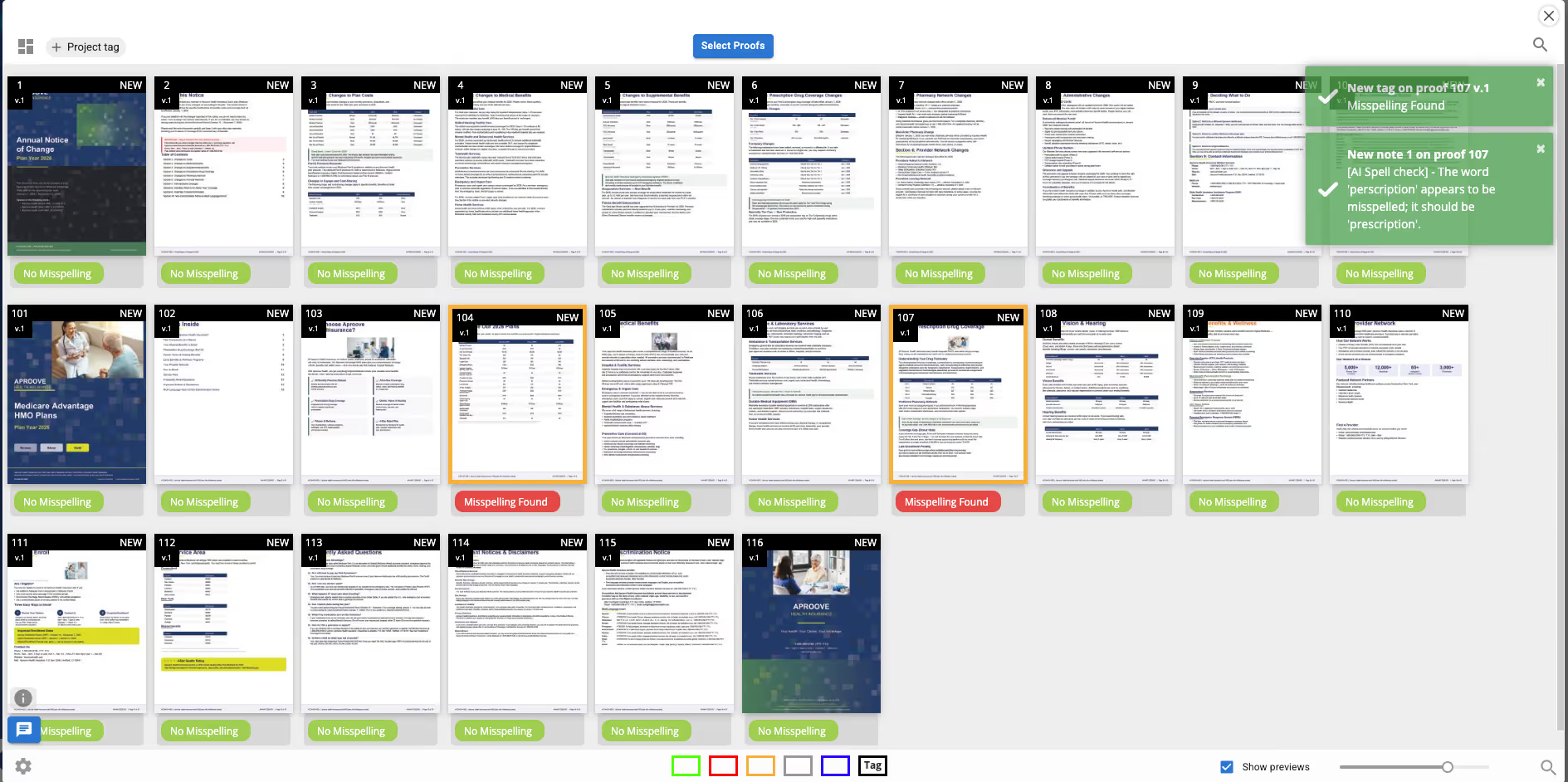
Below -- AI Agents Scanning a File for Risk and Placing Tags: AI Agents can now apply Tags and Notes across multiple pages (and proofs). This can be called by humans, or automated by an Action.
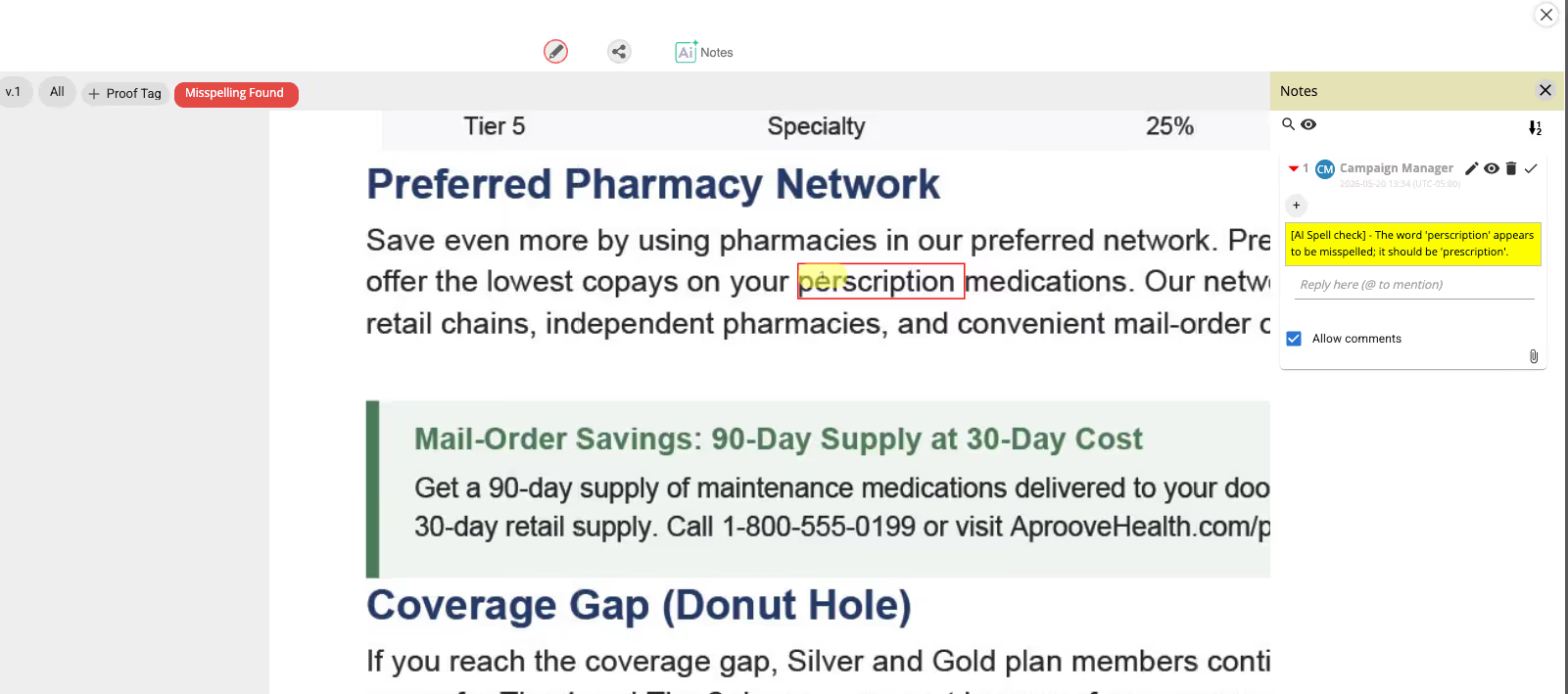
Below -- AI Agents Commenting on Risk in Context: When a user clicks into a proof with a Risk Tag, AI Agent notes will be visible in the Note panel with any risk highlighted on the proof in context.
Improved Session and Time Tracking
Aproove has advanced how teams capture, measure, and report on the time spent inside creative and approval workflows. Across recent releases, we moved from basic timesheet entry to session-accurate effort tracking and a dedicated grid for operational visibility, giving project management and finance teams the data they need to run efficient, accountable production programs.
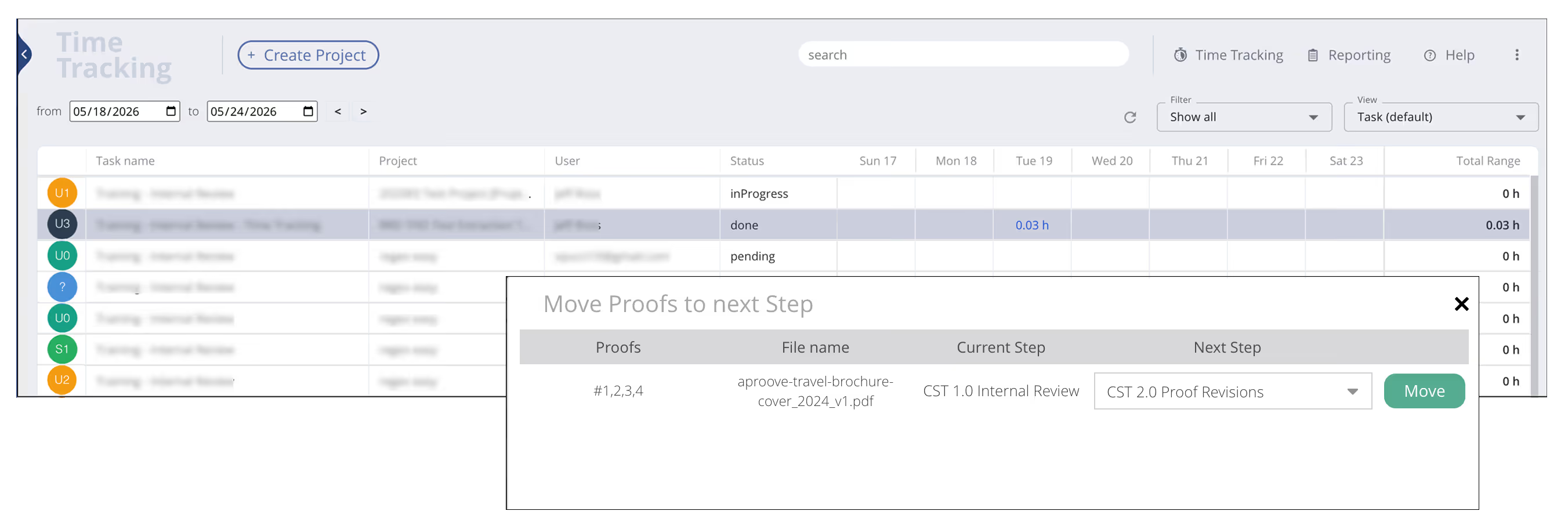
In 2025/R3, we introduced session-level time capture directly inside workflow tasks. Rather than measuring elapsed time from when a task opens to when it closes, Aproove now records discrete work sessions with pause and resume events tied to the actual time spent on a project task. A reviewer who steps away for a call or a meeting does not inflate the time record. Sessions accumulate to reflect effective time on the task, not wall-clock time. A configurable inactivity timeout reinforces this by auto-pausing a session when activity stops, so accurate records do not depend on a user remembering to start :: stop.
Administrators have full control over where session tracking appears in the workflow. It can be enabled or suppressed on a per-task basis, so a creative production step captures time while a routing or notification step does not. An option to hide the session management button while still capturing data in the background gives teams additional flexibility in how the experience is presented to reviewers.
Building on that foundation in 2026/R1, we added the Activity Tracking grid. Accessible from the Time Tracking menu, this new grid-based view allows users and managers to visualize captured session time across tasks in a consolidated, filterable layout. Users can view by task, project, or user, filter between all tasks, their own tasks, tasks in progress, or completed tasks, and select a custom date range. Clicking into any day cell drills down into the individual sessions recorded for that task on that date, including start time, end time, duration, and description. The result is a clear, accountable view of where review and approval hours are going, without leaving Aproove.
Support for HTML5 Digital Formats
Discovery and POC are delivered in R1, establishing the technical groundwork for native review of HTML content. Customer-facing HTML proofing rolls out in subsequent releases on top of this foundation. We are flagging it here, early in the release notes, because it represents a strategic capability arriving across the 2026 cycle, focusing on Aproove's ability to expertly manage the full array of multimedia and digital formats.
Improved Chat and Chatroom Search
Find a moment from your team's conversation last week, share a clean transcript with stakeholders, and stop hitting refresh when someone joins.
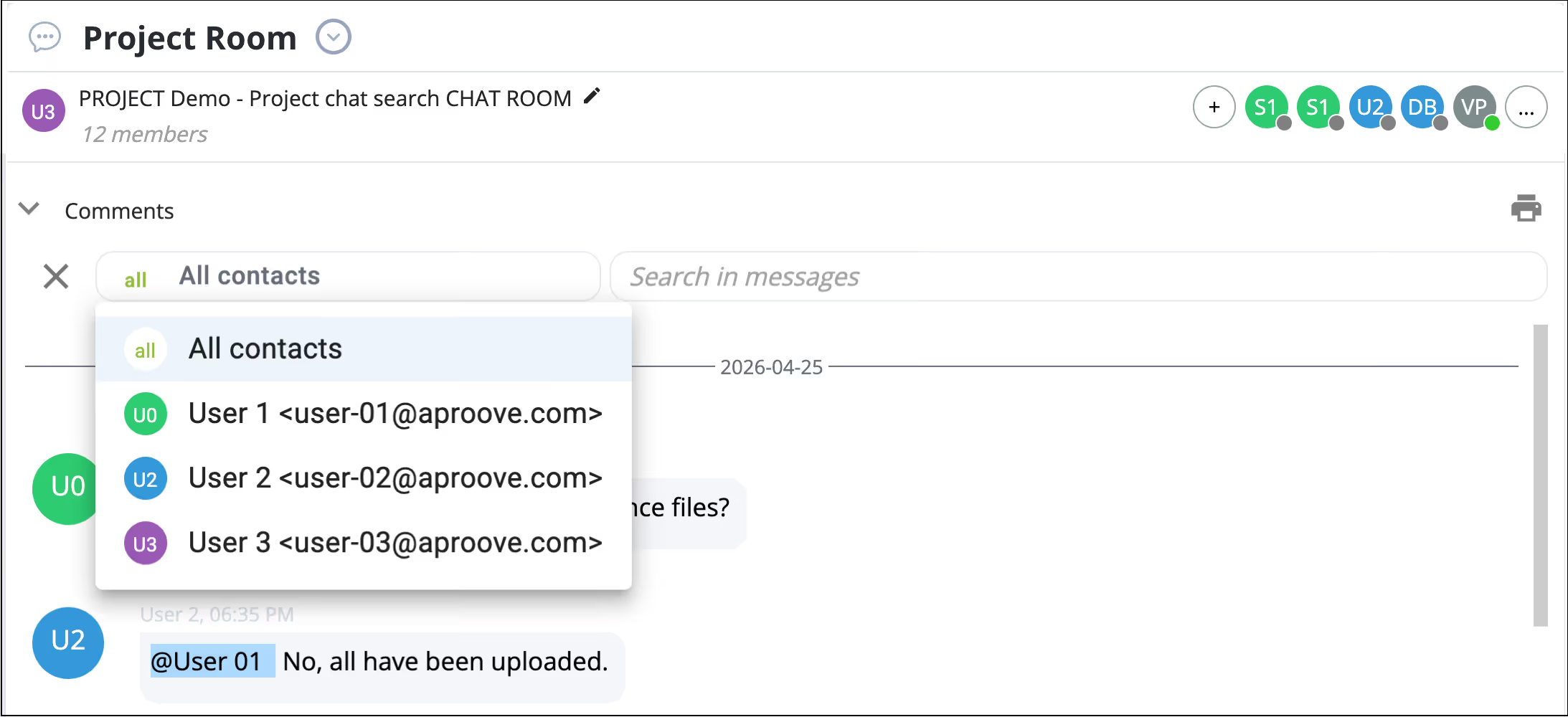
Search inside chat rooms. Quickly find earlier discussion without scrolling through history. Useful for revisiting decisions on long-running projects.
Export chat to PDF. Produce a clean PDF copy of a chat thread for sharing with external stakeholders or archiving alongside the deliverable.
Membership refreshes automatically. When a new user is added to a chat room, the room updates without a manual refresh. A small fix with daily benefits.
Fewer interrupted conversations. Together, these changes mean threads stay legible, retrievable, and inclusive, even as teams rotate in and out of a project.
Workflow Import and Export
Moving a tested workflow from a development environment to production used to mean rebuilding it from scratch, step by step, with every configuration decision repeated by hand. The risk of error was high and the effort was significant for any workflow of real complexity.
In 2026/R1, administrators can export any published workflow as a single file and import it directly into another server. The export carries everything with it: steps, tasks, decision buttons, actions, tags, and metadata. On the receiving server, a quick review confirms what is included, a target team is selected, and the import runs. The workflow is live immediately, with no manual reconstruction and no configuration drift between environments.
The result is a reliable, repeatable process for promoting workflows from development to production, and a meaningful reduction in the time and that process has historically carried.
Improved Dashboard Clarity
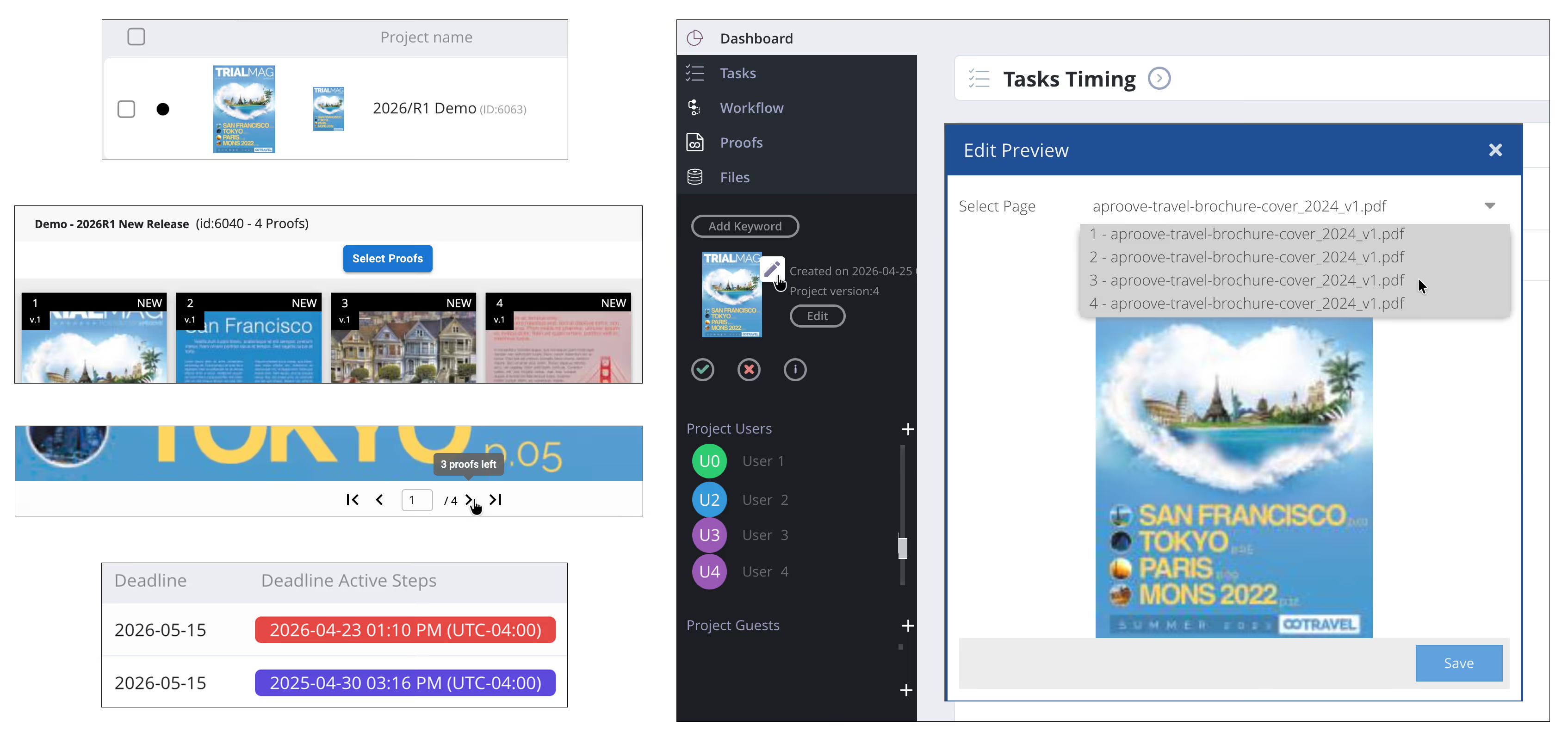
Task metrics that help gauge effort and progress, enhancements to project preview images, and active step deadline at a glance.
"Large Preview" on the dashboard. Choose a more visual layout for at-a-glance recognition of projects. Useful when titles look alike and visuals don't.
Pick the project preview image. Decide which image represents a project on the dashboard, instead of leaving it to whichever asset uploaded first.
Active step deadline on home. See what's next at the moment you log in, without drilling into a project to find the date that matters today.
Cleaner Task View. The number of proofs in a task and the number of proofs remaining to review is displayed directly inside the task.
Quieter, safer administration.
A recovery layer for deleted projects, and expanded trigger conditions.
"Trash can" for deleted projects. A recovery layer so deleted projects can be inspected and, if needed, restored, without an emergency database trip.
Expanded trigger condition. Deadline-date triggers now consider metadata, not just the date itself. This opens up smarter, more conditional automation.
Improvements and performance.
The maintenance work behind the headlines
- Faster Admin → Project History load times.
- Stronger data integrity. Uniqueness constraints reworked for tags and for billing codes.
- Resizable help support window. Drag to fit longer articles or compact docked layouts.
- Better installer behavior. The 2025R0 full installer and updates now install the Aproove Node-RED node and default flows alongside Node-RED itself.