
The proof on your screen is the file that goes to press
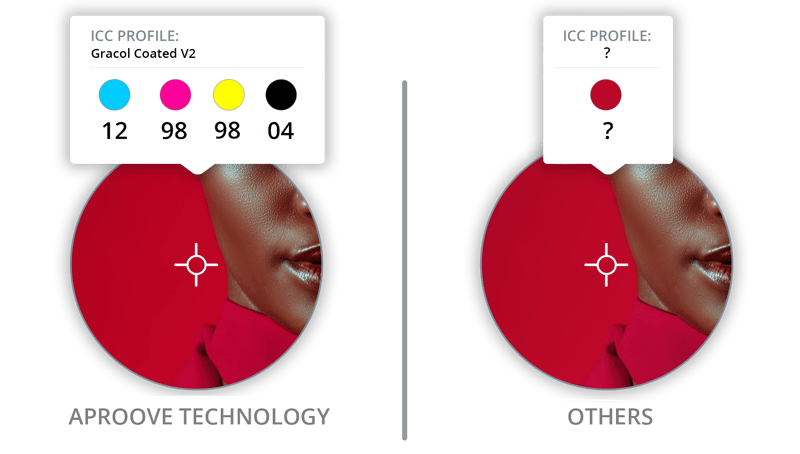
Aproove processes files using genuine Adobe and Microsoft libraries (the same engines behind Acrobat and Office), combined with ICC color management throughout the rendering pipeline. The proof your team sees in the color proofing software is the exact file production will produce. No open-source approximations. No color drift. No surprise when the print arrives.

What it is
Aproove renders source files through OEM-licensed libraries from the vendors that created the formats: Adobe's PDF Library (APDFL) for PDF rendering, Microsoft's libraries for Office formats. Color is managed through ICC profile support throughout the rendering pipeline, including GraCol Coated and other industry profiles configurable per project. The result is a screen proof that matches the file's behavior in its native application and in production output.
The technical pieces matter, but the practical promise is one sentence: what reviewers see on the screen is what the press, the printer, the email client, or the publishing platform will produce. Aproove has the best soft proofing tools for packaging design and more color-dependent content types.
Why it matters
Approving a file means accepting that it will look a specific way when it leaves the platform. If the proof on screen does not match the production output, every approval is a leap of faith. Reviewers learn to discount color (because they cannot trust it), or they over-correct on color (because they have been burned), or they have to print physical proofs to verify what the screen should already be showing them. Cycle time increases. Confidence decreases.
This problem multiplies in regulated and brand-critical work. Pharmaceutical packaging that depends on exact Pantone colors. Brand guidelines that specify color values to the digit. Compliance disclosures that have to render in their specified font and weight. When the proof tool approximates, the approval is approximating too. When the proof tool renders accurately, the approval means what it says.
Aproove uses the actual rendering engines the formats were designed for, not open-source approximations. PDFs render through APDFL because that is what Adobe wrote for Adobe's format. Office documents render through Microsoft libraries because that is what Microsoft wrote for theirs. Color flows through ICC management end to end, so the proof your team sees is the proof production will produce.
How it works
OEM library licensing. Aproove maintains direct licensing agreements with Adobe and Microsoft for use of their rendering libraries. PDFs are processed through the Adobe PDF Library (APDFL), the same engine behind Acrobat. Office files (Word, Excel, PowerPoint) are processed through Microsoft's libraries, ensuring features, formatting, and embedded content render the way the source application renders them.
ICC color management throughout the pipeline. Color profiles travel with the file through processing. GraCol Coated is the default for high-quality sheet-fed print on coated paper, with custom ICC profiles configurable per project type. Spot colors (Pantone, custom inks, varnish, dieline) are preserved as named channels and rendered independently of process color, so reviewers see what the press will print, not a CMYK approximation of it.
Tile-based deep zoom on the rendered output. The rendered proof streams to reviewers through Aproove's proprietary tiling engine (see Performant File Streaming), which means accurate rendering at high resolution is also fast. Deep zoom to pixel-level detail does not require waiting on re-rendering.
Benefits
- The screen proof matches production output. Reviewers approve what production will produce, not an approximation of it.
- No open-source rendering compromise. Adobe and Microsoft libraries via OEM agreements, not stand-in renderers that miss edge cases.
- ICC color fidelity for print buyers. Spot colors, ICC profiles, and color-managed output mean press operators receive what brand teams approved.
- Fast despite the accuracy. Tile-based rendering means accurate rendering is also responsive at any zoom level.
- Print, digital, and document fidelity all in one engine. PDF, Office, and image rendering all use vendor-grade libraries.
Who it's for
- Brand and creative teams approving color-critical work where Pantone match and color accuracy determine whether the asset can ship.
- Production and prepress teams validating files before press, where a color shift between proof and production is a costly mistake.
- Packaging and label specialists working with spot colors, dielines, and varnish where the screen proof has to show channel-accurate output.
- Pharmaceutical, regulated, and compliance teams approving documents where exact rendering of disclosures, fonts, and visual elements is part of the approval.

Built for regulated environments where failures create real risk
Insurance, healthcare, and enterprise teams face unique approval challenges. Aproove handles state-by-state variations, mandated language, FDA submissions, and multi-geography brand governance without breaking a sweat.





Trusted by leaders
Used by teams that cannot afford uncertainty in their approval process.

"Implementing Aproove has dramatically reduced errors, increased motivation and satisfaction across the teams and importantly, saved the operation significant hard costs."


“The Aproove team are the best team in the world. I feel like I'm their only customer, they are always there for me.”


"Within a short period, we were able to reduce 25 workflows into a single workflow. The team saw a 15-week reduction in getting new marketing packages from idea to market. More importantly, it ensured that all the packages were compliant with regulatory requirements. All steps, comments, and approval are captured and saved for any audits."

More ways to streamline high-stakes workflows




See the rendering accuracy that lets your team approve with confidence
