Adobe Workfront is a powerful work management platform. It runs marketing operations, project portfolios, resource planning, and cross-team coordination at enterprise scale. For large insurance organizations managing complex project pipelines, Workfront is a substantial investment that pays off in orchestration, visibility, and capacity management.
Aproove handles the last mile: the moment where regulated content gets reviewed, approved, and proven. Member communications, plan documents, marketing materials, disclosure filings, claims correspondence. The work that has to be accurate, defensible, and auditable when CMS asks, when a state DOI asks, or when a market conduct examiner asks.
Workfront orchestrates the work. Aproove finishes it.
Why the last mile is the hardest part
Most regulated content moves through a long lifecycle: brief, intake, asset development, internal review, regulatory review, approval, distribution. The first 90 percent of that lifecycle is general work management. The last 10 percent is regulated approval, and that's where the architecture has to change.
The last mile is where content stops being a project and starts being a regulated artifact. Every decision becomes auditable. Every change has to be documented. Every approval has to stand up to scrutiny. Every AI action has to be governed and traceable. The tools that work for general project orchestration aren't built for that specific moment, because that's not what they're optimized for.
Aproove is built for that moment. The next three sections show where the depth matters.
Where Aproove's depth in the last mile goes further
File processing built for regulated documents
Workfront: Files move through Workfront Proof as documents. Reviewers mark up PDFs, images, and videos at the file level. Versions are tracked file by file.
Aproove: Aproove breaks every file down to its pixel-level components through a process called atomic extraction. Text, images, colors, layout blocks, and pages are extracted as structured data, not just displayed as a flat document. That component-level understanding means only changed sections trigger review, AI can analyze specific elements rather than whole files, and risks surface at the exact component rather than buried in a large document.
Why it matters in the last mile: A 60-page Evidence of Coverage changes in three benefit summaries between plan years. In file-level proofing, reviewers re-examine the whole document. With atomic extraction, only the three changed benefit summaries route for review, with the rest of the document locked as already approved. The same principle applies to multi-state policy variants, multi-language member communications, and any content where small, regulated changes hide inside large documents. In the last mile, that precision is the difference between hitting a regulatory deadline and missing it.
AI governed inside the regulated workflow
Workfront: Workfront offers AI capabilities through Adobe's broader AI ecosystem, including Adobe Firefly Services and AI features integrated across the Experience Cloud. These operate at the project, asset, and content production layer.
Aproove: Aproove embeds AI inside the approval workflow itself, with governance defined at every step. AI analyzes files at the component level, flags compliance and brand risk before human review, and routes content based on what it finds. Every AI action is logged in the audit trail with the model used, the inputs analyzed, and the outputs generated. Humans retain every final decision.
Why it matters in the last mile: CMS, state regulators, and market conduct examiners are increasingly asking not just whether AI was used in producing member communications and marketing materials, but how it was governed at the moment of approval. AI in the broader content production layer is powerful for asset creation and personalization. AI inside the approval workflow, with audit-grade capture of every action, is what regulators are asking about. That last mile is where AI governance has to be airtight.
Audit trails built for regulatory defense
Workfront: Workfront captures activity logs and approval history. Audit reports can be generated and exported for compliance purposes.
Aproove: Aproove's audit trail is immutable, timestamped, and captured as work happens, not logged after the fact. Every approval, rejection, comment, version change, permission change, and AI action is recorded with user identity and tied to the specific content component and workflow step involved. The trail is built to Grade 1 audit standards and designed to serve as forensic evidence in regulatory response, legal discovery, or market conduct examination.
Why it matters in the last mile: Activity logs show what happened. A defensible audit trail proves how decisions were made, in the context they were made, with the evidence preserved immutably. When a CMS reviewer questions a marketing piece, or a state DOI requests documentation on how a policy form was approved, the evidence has to already exist in the form regulators expect. The last mile is where that evidence is generated, and where the difference between an activity log and a forensic record becomes existential.
How the integration works
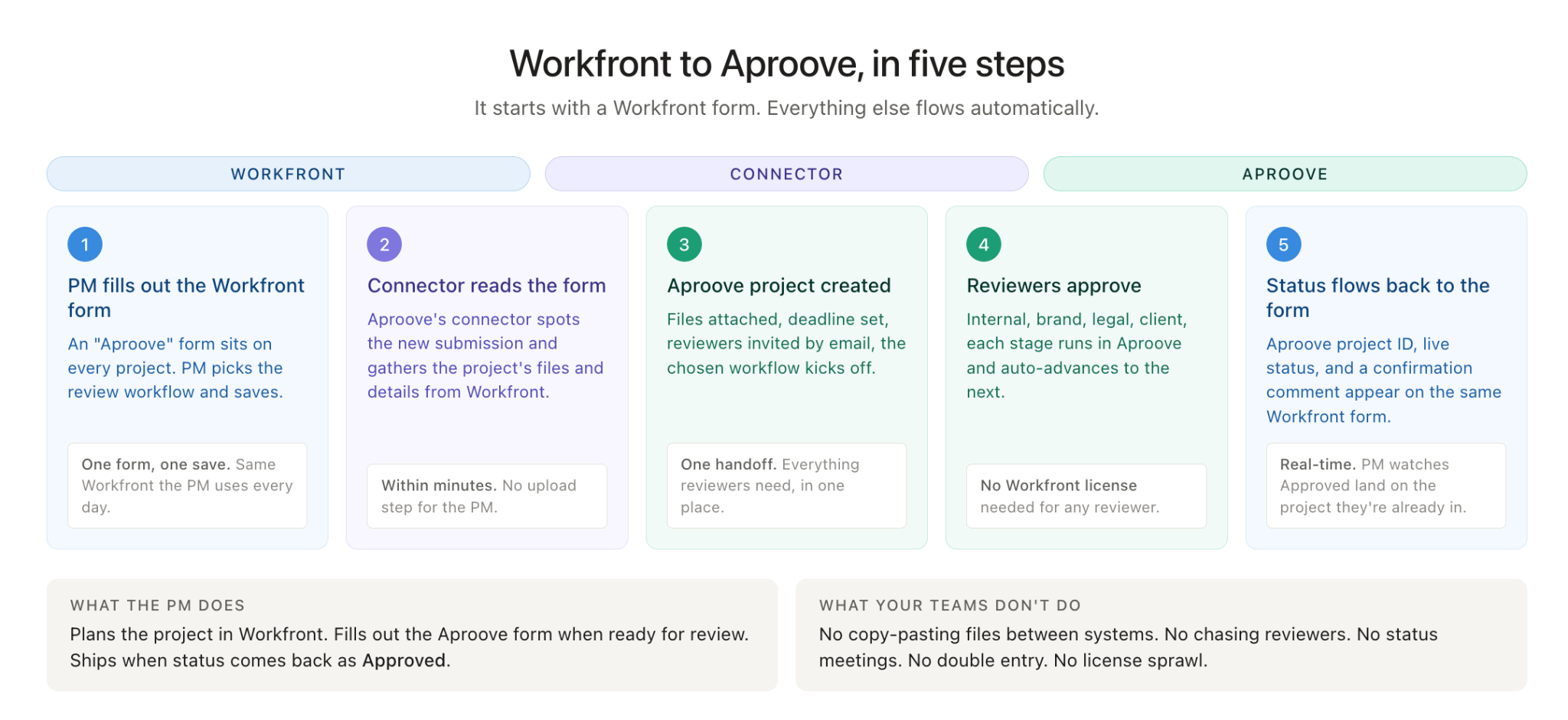
The Workfront-Aproove integration moves projects and status between the two platforms automatically. PMs work in Workfront. Reviewers work in Aproove. The handoff between orchestration and the regulated last mile happens without anyone having to leave their primary system.
Two handoffs
Kickoff (Workfront to Aproove): When a Workfront project reaches the regulated approval stage, an automated handoff sends the relevant assets to Aproove, along with the approval workflow configuration, due date, and any business metadata that should travel with the project. Aproove creates a project in the right approval workflow and the regulated review process begins.
Status sync (Aproove to Workfront): As the last mile progresses in Aproove, status changes flow back to Workfront automatically. The Workfront task updates as the project moves through "in review," "in revision," and "approved" states. Comments and key milestones post to the Workfront Updates tab, so PMs see review progress without leaving Workfront.
What flows between the systems
Going to Aproove from Workfront:
- Files and assets to be reviewed
- Approval workflow configuration (which review process to run)
- Due date and priority
- Business metadata (cost center, plan codes, campaign IDs, state, line of business)
Coming back to Workfront from Aproove:
- Aproove project ID for cross-reference
- Live status updates as the project moves through review
- Auto-posted comments to the Workfront Updates tab
- Final approval status when the workflow completes
What's invisible to end users
A middleware layer handles the integration mechanics, including authentication, payload translation, and status callbacks. End users in Workfront and Aproove don't manage the middleware. PMs see Workfront. Reviewers see Aproove. The integration just works.
That diagram shows the full lifecycle: kickoff (Workfront sends files and config to Aproove via middleware), review cycle (Aproove sends status and comments back through middleware to Workfront), and sign-off (final approval status flows back). Three labeled phases on the left make the sequence scannable.
Common deployment patterns
Insurance organizations using both Workfront and Aproove typically follow one of three patterns.
Pattern 1: Workfront orchestrates, Aproove handles regulated review Marketing teams plan campaigns, manage creative production, and coordinate cross-team work in Workfront. When a deliverable reaches the regulated review stage (CMS marketing material approval, state DOI filing, plan document update), the integration hands it off to Aproove for governed review. Once approved, the asset returns to Workfront for distribution and tracking. This is the most common pattern.
Pattern 2: Workfront for the project shell, Aproove for the full last mile Workfront holds the project metadata, deadlines, and resource allocation. Aproove runs the complete last-mile content lifecycle: intake, asset development, iterative review, AI-assisted compliance scanning, and final approval. Status flows back to Workfront so PMs see end-to-end progress in one place.
Pattern 3: Aproove as the audit-of-record system, Workfront for everything else Aproove becomes the system of record for any content with regulatory weight (member communications, marketing materials, plan documents). Workfront continues to manage all other project work (internal initiatives, IT projects, operational programs). Each platform owns the work it's best at.
When comparing work management platforms, businesses face a critical choice between broad enterprise solutions like Adobe Workfront and specialized platforms such as Aproove. While Adobe Workfront offers a robust suite of features geared toward large-scale project and resource management, Aproove provides an integrated, compliance-driven approach tailored to industries requiring rigorous proofing, marketing compliance, and flexible workflows. This comprehensive comparison shines a light on why Aproove is the superior choice for teams seeking efficiency, control, and security within a single solution.














.avif)