
Back to blog
Icon showing a gradient blend transition from red on the left to blue on the right on a small rounded square.
Featured
Icon showing a gradient blend transition from red on the left to blue on the right on a small rounded square.
New release
Close-up of green-yellow onion bulbs with a slight root at the bottom.
Educational
Illustration of a blue whale transitioning into green geometric shapes on a white background.
Newsletter

Aproove 2023/R4 Maintenance is now Released!

Written by: Gary Fisher

The 2023/R4 release provides improved back-end performance and a new feature to collect and collate all project data as an archive zip for compliance purposes!


2023/R4 was a planned maintenance release that improves back-end functions inside Aproove, giving some speed and performance enhancements. However, we can never make a release without giving some new functionality! 

Below is some further information about the 2023/R4 release!

Project Collection 

Download a .zip file containing all your vital project compliance information! 

Aproove could already export the annotated PDF, project history, proofs, and project files. However, as we introduced new capabilities into the product, such as project chat, providing a download link to collate all relevant project files and history into one zip file, allowing you to store the Zip file on Aproove or a third-party system.

This is a critical compliance requirement for many of our customers. The download can be executed at any time in the project's lifecycle and even after it has been set to Archived status. 

Combine this new feature with Aproove's already existing triggers and actions, and you can fully automate the zip export. The export could even automatically get sent to a 3rd party storage or DAM system.  

DownloadZIPProject-1
  • A user manually navigating to a project. 

  • Once the project is open, the user selects the "Export" menu.

  • The "Export" menu now contains the "Project Collection (zip) option. 

  • Upon selection, the zip will collate and download (Please note, depending on project size, this could take a bit of time)
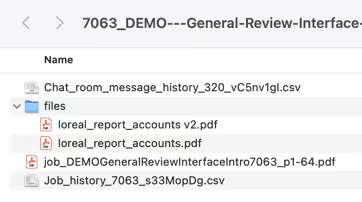
Project Zip

When you unzip the file you will find ;

  • Chat Room Message History (CSV Format)
  • Project Files and Proof Versions
  • Final Annotated PDF containing all the markup and note history
  • Job History (CSV Format) detailing  the entire project history 

Chat Room Message History

  • The Chat Room Message History has also been added to the "Export" menu as a stand-alone item for those who just specifically want the chat room history without the other files. 

And that's not all!

  • R4 continues to add more features to our Project Planning and Resource Management modules which, will be announced early next year. 

  • Multiple back-end performance updates to enhance the dashboard speeds and responsiveness. 

  • Allow the "Add Tag" Action to accept project level and task level metadata

  • Add support for Project Metadata in the API 

  • Add "Flow Batch Split" on the Section Rules Action

Please get in touch with us if you would like access to the full technical release notes or to discuss any topics related to the 2023/R4 release. 

Audit-ready at a moment’s notice.

Aproove makes accuracy, speed and scale realistic for regulated content. 

Resources

Keep on reading

Close-up of digital noise or static texture with scattered gray and black pixels on a white background.

Aproove 2026 R5: dependable multi-threaded processing, and grids that hold their order

Aproove 2026 R5 makes multi-threaded file processing dependable in production, names the file behind a processing failure, and gives the large project and task grids a stable sort order.

5 min read
Icon showing a gradient blend transition from red on the left to blue on the right on a small rounded square.
New release
Close-up of digital noise or static texture with scattered gray and black pixels on a white background.

Aproove’s AI Philosophy

Proper AI governance and AI Agent use in regulated fields require great planning and strategy. Learn how Aproove’s AI philosophy helps teams manage workflows.

10 min read
Illustration of a blue whale transitioning into green geometric shapes on a white background.
AI
Icon of a plant seed sprouting with two green leaves on a gradient green to yellow background.
Compliance
Illustration of a human head with a yellow and blue gradient, showing a transparent brain with highlighted neural networks and connections inside.
Workflow automation
Close-up of digital noise or static texture with scattered gray and black pixels on a white background.

Two Documents, Two Deadlines: Why Your ANOC Approval Workflow Shouldn't Match Your EOC Review

An ANOC approval workflow and an EOC review answer two different questions. See how plan teams route, review and document each one before the plan-year deadlines.

10 min read
Icon of a plant seed sprouting with two green leaves on a gradient green to yellow background.
Compliance
Illustration of a blue whale transitioning into green geometric shapes on a white background.
Insurance marketing
Illustration of a blue whale transitioning into green geometric shapes on a white background.
Workflow management

Audit-ready at a moment’s notice.

Aproove makes accuracy, speed and scale realistic for regulated content.

Abstract blurred gradient background blending green, blue, and yellow colors.